> ## Documentation Index
> Fetch the complete documentation index at: https://docsy3.mile.app/llms.txt
> Use this file to discover all available pages before exploring further.

# Start Finish Icon and History

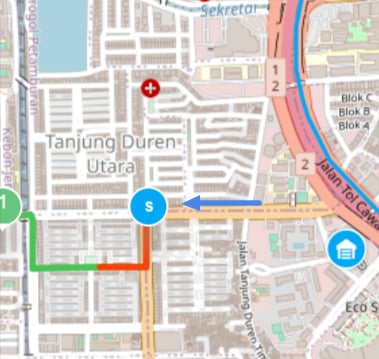
The Start Finish icon and history will be shown on the Task Tracking page if the user has clicked the Start / Finish button on the field mobile app. This Start and Finish history will be shown as an icon on the Tracking map.

## Start Icon and Information

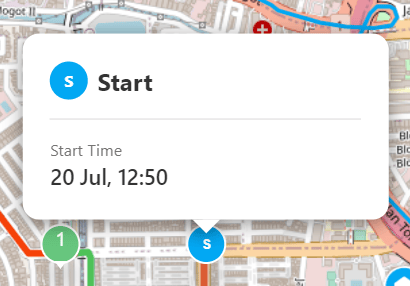
The Start (S) icon on the map is a clickable icon that will show you the information about the Start Time of the user.

<div align="center">
  <img src="https://mintcdn.com/mile-app/zU7ITx5EHKU-BmIW/images/configuration/start-finish-icon-and-history-01.png?fit=max&auto=format&n=zU7ITx5EHKU-BmIW&q=85&s=193d7022abef299075ab7059a07aee11" alt="Start icon on tracking map" width="600" data-path="images/configuration/start-finish-icon-and-history-01.png" />
</div>

<div align="center">
  <img src="https://mintcdn.com/mile-app/zU7ITx5EHKU-BmIW/images/configuration/start-finish-icon-and-history-02.png?fit=max&auto=format&n=zU7ITx5EHKU-BmIW&q=85&s=6160488d495934fe26a3594cdd8cc91f" alt="Start information card" width="400" data-path="images/configuration/start-finish-icon-and-history-02.png" />
</div>

* The Start Time is the time when the user clicks the Start button on the mobile app.

## Finish Icon and Information

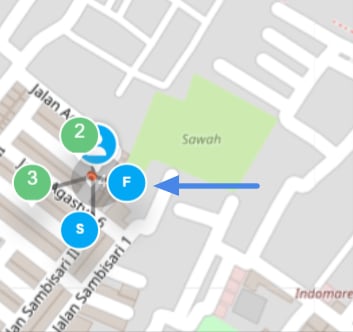
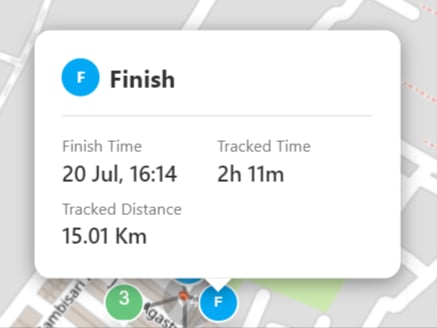
The Finish (F) icon on the map is a clickable icon that will show you the information about the Finish Time, Tracked Time, and Tracked Distance of the user.

<div align="center">
  <img src="https://mintcdn.com/mile-app/zU7ITx5EHKU-BmIW/images/configuration/start-finish-icon-and-history-03.png?fit=max&auto=format&n=zU7ITx5EHKU-BmIW&q=85&s=b8aa0fabcdc58eda1ac2ec6146b56dc5" alt="Finish icon on tracking map" width="600" data-path="images/configuration/start-finish-icon-and-history-03.png" />
</div>

<div align="center">
  <img src="https://mintcdn.com/mile-app/zU7ITx5EHKU-BmIW/images/configuration/start-finish-icon-and-history-04.png?fit=max&auto=format&n=zU7ITx5EHKU-BmIW&q=85&s=bdfe7963b86c2b82c0f32d3501ddb40d" alt="Finish information card" width="400" data-path="images/configuration/start-finish-icon-and-history-04.png" />
</div>

* The Finish Time is the time when the user clicks the Finish button on the mobile app.
* The Tracked Time is the total time since the user Start until the click the Finish button on the mobile app.
* The Tracked Distance is the total distance time since the user Start until the click the Finish button on the mobile app.

## Multiple Start and Finish Session

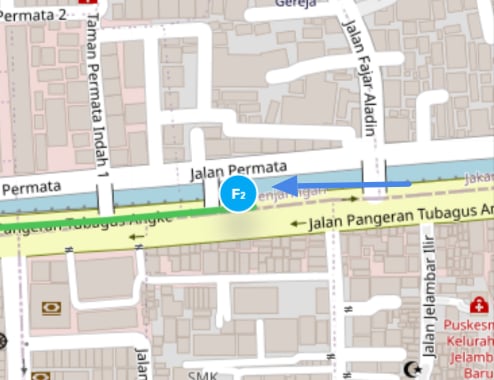
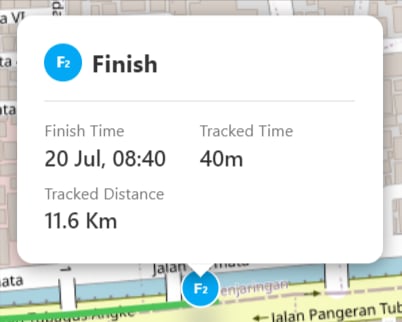
If there's more than 1 Start Finish session in a day, The Start Finish icon and information card will have a number on it to show the connection between each Start Finish in each session.

For example, if there are 3 Start Finish sessions in a day, the first session Start Finish will have number 1 on the icon, the next session will have number 2 on the icon, and so on.
<div align="center">
  <img src="https://mintcdn.com/mile-app/zU7ITx5EHKU-BmIW/images/configuration/start-finish-icon-and-history-05.png?fit=max&auto=format&n=zU7ITx5EHKU-BmIW&q=85&s=5d9543328f132df8fee84e10595e48b1" alt="Multiple sessions on tracking map" width="600" data-path="images/configuration/start-finish-icon-and-history-05.png" />
</div>

<div align="center">
  <img src="https://mintcdn.com/mile-app/zU7ITx5EHKU-BmIW/images/configuration/start-finish-icon-and-history-06.png?fit=max&auto=format&n=zU7ITx5EHKU-BmIW&q=85&s=fca2f4b4e261824759bb9eed2db24aba" alt="Multiple sessions information card" width="400" data-path="images/configuration/start-finish-icon-and-history-06.png" />
</div>