> ## Documentation Index
> Fetch the complete documentation index at: https://docsy3.mile.app/llms.txt
> Use this file to discover all available pages before exploring further.

# Filtering and Editing Vehicle

## Filtering Vehicle

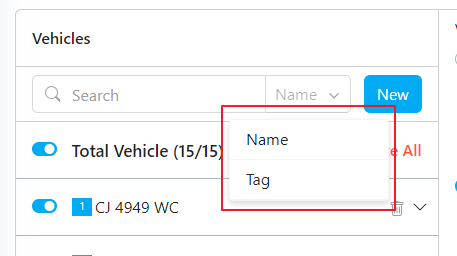
In case you need specific Vehicle data, you can filter by vehicle name or tag.

<div align="center">
  <img src="https://mintcdn.com/mile-app/MUIsaJjssf9Cm1te/images/route-optimization/vehicle/filtering-and-editing-vehicle-01.png?fit=max&auto=format&n=MUIsaJjssf9Cm1te&q=85&s=f5c7b9de5b24bd0d39ca96984bd2b581" alt="image" width="600" data-path="images/route-optimization/vehicle/filtering-and-editing-vehicle-01.png" />
</div>

<p><em>Filtering Vehicle</em></p>

## Editing Vehicle

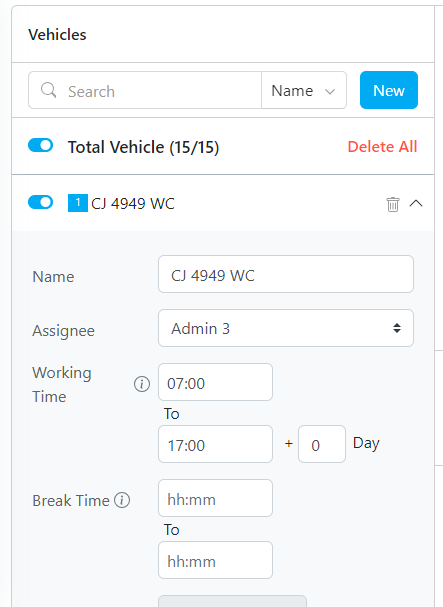
When you need to see the detail vehicle or editing some fields, simply click the arrow button to expand.

<Note>
  Required permission:

  * View Vehicle
  * Edit Vehicle
</Note>

<div align="center">
  <img src="https://mintcdn.com/mile-app/MUIsaJjssf9Cm1te/images/route-optimization/vehicle/filtering-and-editing-vehicle-02.png?fit=max&auto=format&n=MUIsaJjssf9Cm1te&q=85&s=93cea8e7f296cce174ff482cb4876077" alt="image" width="600" data-path="images/route-optimization/vehicle/filtering-and-editing-vehicle-02.png" />
</div>

<p><em>Vehicle Detail</em></p>