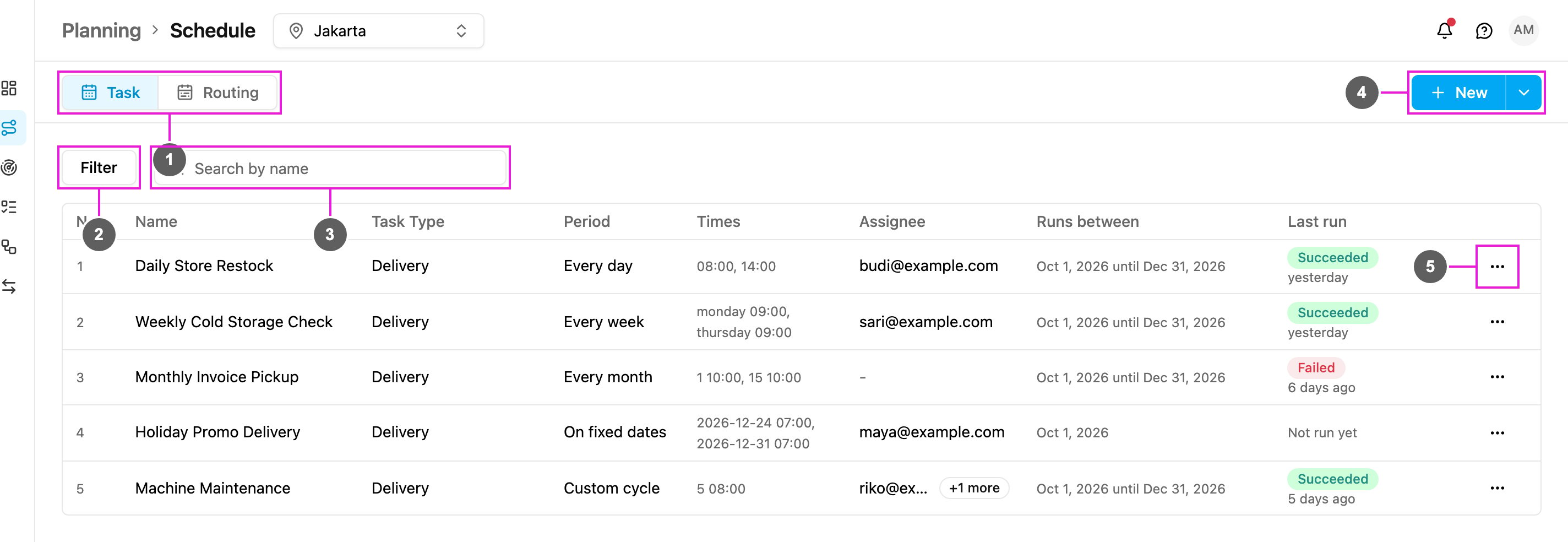
A task schedule creates tasks for you on a repeating plan. If a task has to happen every week for the next three months, set up one schedule instead of creating the task by hand each week. Examples are a store restock every morning, a cold storage check every Monday and Thursday, or a machine service every two months. Each time a schedule comes due, it creates one task from the flow you chose, with the values you filled in, assigned to the people you picked. Open Planning › Schedule. The Task tab is selected.
Required permission:
  • View schedule
Task schedule list
  1. Task / Routing: switch between task schedules and routing schedules.
  2. Filter: narrow the list by status, assignee and flow.
  3. Search by name: find a schedule by part of its name.
  4. New: create a schedule. The arrow beside it opens Bulk, to create many schedules from a spreadsheet.
  5. Actions of a schedule: View, Edit and Delete. See Manage Task Schedules.
The list shows the schedules of the hub selected at the top of the page. Switching the hub reloads the list. Click Calendar beside List to see the same schedules on a month calendar. See Calendar View.

Repeat cycles

A schedule repeats in one of five ways:

In this section