The order type editor: fields, statuses, steps and every step type, assigning tasks, and saving.
Open an order type from Workflow › Order Type to edit it. The editor has three tabs, Fields, Statuses and Steps, and one Save button that makes your changes live.
Required permission:
View Order Type
Edit Order Type
Without Edit Order Type the editor opens read-only and says You can view this Order Type but not change it.
The editor
Rename
Changes the order type’s name. See Rename an order type. The name itself is shown once, in the breadcrumb at the top.
Tabs
Fields, Statuses and Steps. After a save that found problems, a tab shows how many problems it holds, for example 2 problems.
Test order
Runs the order type on sample values without saving anything. See Test an order type.
Save
Saves your changes and, when nothing blocks it, makes them live for new orders. See Save and go live.
Add field
Adds a field to the order type.
Field row
One field per row, described below.
Fields
Fields are the data every order carries: customer, address, items. Each row has:
Setting
What it does
Title
The field’s name as people see it on the order form and the order page.
Type
What kind of value the field holds (see below).
Required
The order cannot be created without a value.
Show on table
Shows the field as a column in the order list.
Unique
No two orders of this order type may hold the same value. Not every type can be unique.
Delete (bin icon)
Removes the field. A field that orders already use is archived instead, and can be restored.
Drag a row by its handle to change the order of the fields.Field types:
Type
Holds
Text
Free text.
Number
A number.
Option
One of a list of options you type in.
Date, Date & time, Time
A date, a date and time, or a time of day.
Phone number
A phone number.
Coordinate
A map location.
Reference to data
A record from a data source.
List (line items)
Rows of items, with their own columns, for example item, quantity.
User
A user of your organization.
Yes / No
A yes or no answer.
Once orders hold a value for a field, its type can no longer be changed and it cannot be removed, only archived. The row says how many orders have a value.
Statuses
Add status
Adds a status.
Label
The status name people see, for example Picked up.
Category
Every status belongs to one category:
New: where every order starts. Add exactly one status in this category.
In progress: the order is being worked on.
Completed: the order is finished. These are marked Final; add at least one. A Finish order step can only end an order in a Completed status.
Drag a row to change the order of the statuses, or use the bin icon to remove one. A status that orders are currently in cannot change category or be removed.
Steps
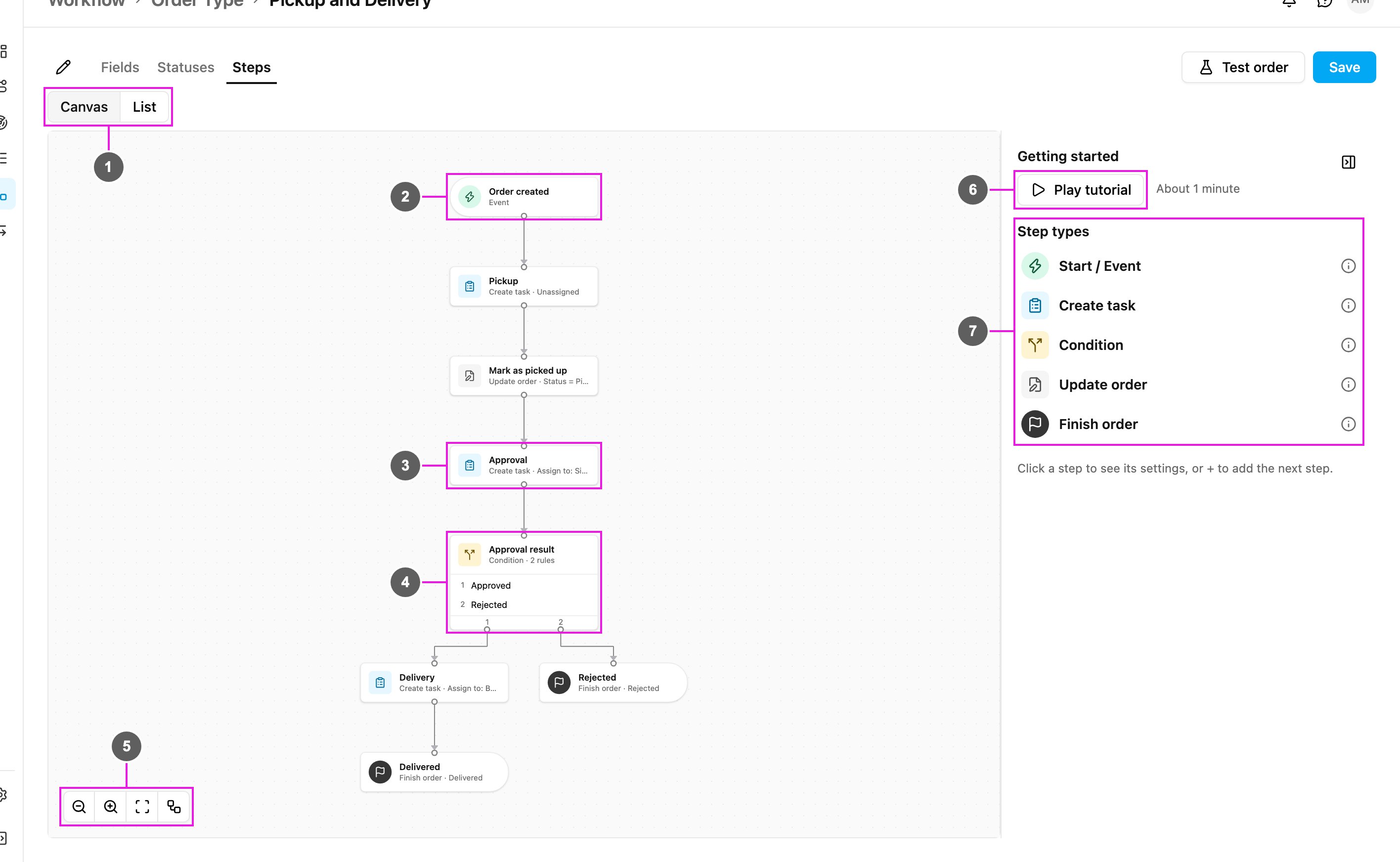
The Steps tab is where you decide what happens to an order. It opens as a canvas, with a guide panel on the right.
Canvas / List
Switches between the canvas and a list of the steps.
Trigger
The first step: what starts the order.
Step card
Each card shows the step’s name and, below it, its type and the most important setting, for example Create task · Assign to: Siti Rahma (Supervisor).
Condition card
A Condition lists its rules. Each rule is its own exit, with its own path below it.
Canvas controls
Zoom out, Zoom in, Fit to screen and Auto-layout, which rearranges the steps neatly from top to bottom.
A short description of each step type. Hover the info icon of a type for more.The canvas is meant for a desktop or tablet. On a narrow screen it says Use a wider screen to drag and connect.
List view
List shows the same steps as a table, which is easier to scan on a large order type.
Step row
Each row shows the step’s Type, its Name, its Problems and where it Goes to. A Condition lists each rule with its next step, for example Approved: Delivery.
Add the first step
A new order type has an empty canvas with an Add first step tile.
Add first step
Opens Choose a trigger.
Order created
Starts when an order is created: from the order form, the API, an import, or a Task finished trigger of another order type. An order that is updated through its duplicate key does not start again.
Status becomes…
Starts when the order reaches the status you choose. It runs once per order, the first time the order reaches that status.
Task finished
Creates an order when a task of the chosen flow is done. See Task finished.An order type has one trigger.
Add the next step
Every card has a + under it. Click it to open What happens next?
Search steps
Filters the list by name.
Actions
Adds a new step: Create task, Condition, Update order or Finish order.
Connect to an existing step
Draws a line to a step that already exists instead, so two paths can join. Steps that cannot be used are greyed out and say why: Would loop or Already connected.On a desktop you can also drag from a card’s handle to another card to connect them. To remove a line, select it and click its Delete line button, or press Delete.
Read and edit a step
Click a card to open its summary in the side panel.
Settings
The step’s settings, read-only. Not set means a setting is still empty.
Next
Where the order goes after this step, and Add parallel step to start a second path from the same exit. For a Create task step the exit is When the task is done.
Comes from
The steps that lead here. Click one to jump to it.
Delete
Deletes the step. If other steps can then no longer be reached, the app names them and asks you to confirm with Delete only this.
Edit
Switches the panel to editing. Change the settings, then click Done.The step name at the top of the panel can be changed while editing. When no step is selected, the panel shows the guide: Getting started and the Step types.
Step types
Order created and Status becomes
Add next step
Adds the step that follows the trigger.
Connect to…
Connects the trigger to a step that already exists.Order created has no other settings. Status becomes… asks for the status: When the status becomes.
Task finished
A Task finished trigger creates orders from finished tasks, for example one order per finished Pickup task. Its settings:
Flow: which flow’s tasks start an order.
Only if (optional): conditions on the task’s answers. If they do not match, no order is created.
Task answers → order fields: which task answer fills each order field. A required order field with no value is reported as a problem.
How many orders: One per task, or One per row of a list in the task, so a task with five rows creates five orders.
Tasks created by an order never start a new order. Later steps can read the triggering task’s answers.
Create task
Creates a task and waits until it is done.
Flow
The flow the task is made from.
Assign to
Unassigned: the task is created without an assignee, to be assigned later.
A user: first choose a Role, then pick a user who holds that role. The card then reads Assign to: Siti Rahma (Supervisor).
How many tasks
One per order, or One per row of a list field of the order, so an order with three line items gets three tasks.
Task data
Fills fields of the new task, each from an order field, an earlier answer or a fixed value.
Save answers to the order
Copies answers from the finished task into order fields. Optional: a Condition can read answers without saving them.
Delete
Deletes the step.
Done
Leaves editing and shows the summary again.The task is created in the order’s hub. The order moves on when every task this step created is settled.
Condition
Sends the order down the path whose rule matches.
Rule name
The name of the rule, which is also the name of its exit on the card, for example Approved.
Value to check
An order field, an earlier task answer, or the attempt count of a Create task step.
Operator and value to compare
The operator (equals, does not equal, greater than, at least, less than, at most, contains, is empty) and what to compare with: a Fixed value or another field or answer. For a list, choose whether All rows or Any row must match.
Add condition (AND)
Adds another condition to the same rule. All of them must match.
Goes to
The step this rule’s path leads to, with Add next step and Connect to….Add more rules with Add rule, and use a rule’s ⋯ menu to move it up or down or delete it. Every rule that matches runs. If none matches, the order stops and needs attention, so cover every case, for example with both Approved and Rejected.
Update order
Sets order fields or the status.
Set fields
Add field sets an order field from an earlier answer, another field or a fixed value.
Set status
Don’t change: keeps the status.
Fixed status: always sets the chosen status.
From a choice answer: picks the status from an earlier choice answer, using an Answer → status table. An answer not in the table leaves the status unchanged.
Set at least one field or a status. Update order cannot set a Completed status; use Finish order for that.
Finish order
Sets the final status and ends the order.
Final status
A status in the Completed category.When a Finish order runs, other paths that are still running stop. A Finish order has no next step.
Problems
The editor checks the order type when you save. Problems appear on the cards, in the step panel under Problems and Warnings, and as a count on each tab. Common ones:
Add a trigger to start these steps, or An Order Type can have only one trigger.
Unreachable: no line leads here: a step no path reaches.
Dead end: every path must end at Finish order.
This line would make a loop: steps cannot go back to an earlier step.
… is required: a step setting is still empty, for example Flow is required.
No rule covers: …: a Condition leaves some choice answers without a path.
Add exactly one status in the category New and Add at least one status in the category Completed.
Save and go live
There is one Save. It saves your changes and checks the order type:
No problems: the changes go live at once and the app says Saved. New orders use it.
Only warnings: a Check these warnings dialog lists them. Click Save anyway to go live, or go back and fix them.
Problems: a Fix these to go live dialog lists them. Your changes are saved as a draft. They go live once these are fixed. The list shows the order type as Published · draft changes (or Draft if it was never live) until you fix them and save again.
Orders already running keep the version they started with; new orders use the latest live version.If someone else saved the same order type while you were editing, the app says This draft changed while you were editing and offers Reload to see their changes or Overwrite to keep yours. Leaving the editor with unsaved changes asks you to Discard changes or Keep editing.
{"docsConfig":{"theme":"mint","$schema":"https://mintlify.com/docs.json","name":"Docs","colors":{"primary":"#02A8F3","light":"#02A8F3","dark":"#028FCF"},"favicon":"https://mintcdn.com/mile-app/JbFasViqaZTzE9Zc/favicon.ico?fit=max\u0026auto=format\u0026n=JbFasViqaZTzE9Zc\u0026q=85\u0026s=4e7ddbcee052a480a983e57b5e25103b","api":{"playground":{"display":"interactive"},"mdx":{"auth":{"method":"bearer"}}},"search":{},"seo":{"metatags":{"robots":"noindex, nofollow"}},"styling":{"latex":false},"navigation":{"pages":[]}},"deployment":{"deploymentMetadataValue":{"subdomain":"mile-app","hasAudioNarration":false,"actualSubdomain":"mile-app","customDomains":["docsy3.mile.app"],"gitSource":{"type":"gitlab","owner":"paketid","repo":"mileapp-docs","deployBranch":"whitelabel","contentDirectory":"","isPrivate":true,"projectId":76553900,"mountPath":"","label":""},"entitlements":{"AI_CHAT":{"status":"DISABLED"},"WEB_MCP":{"status":"DISABLED"},"NARRATION":{"status":"DISABLED"}},"buildId":"6af56e88185706f0def03fc0","clientVersion":"0.0.4128","searchFilterCounts":[{"language":"default","tag":"API Reference","count":374},{"language":"default","tag":"Guides","count":204},{"language":"default","tag":"Workflow","count":142},{"language":"default","tag":"Settings","count":118},{"language":"default","tag":"Planning","count":102},{"language":"default","tag":"Routing","count":89},{"language":"default","tag":"Activities","count":75},{"language":"default","tag":"Task","count":75},{"language":"default","tag":"Flow","count":50},{"language":"default","tag":"Analytics","count":45}]},"assistantConfig":{"enableAskAiButton":false,"enableStarterQuestions":false,"enableContextualStarterQuestions":false,"enableAskAiSearchBar":true},"basePath":"","hasChatPermissions":false,"hasWebMcpPermissions":false,"toggles":[{"name":"kill-isr","enabled":true,"variant":{"name":"disabled","enabled":false,"feature_enabled":true},"impressionData":false},{"name":"custom-rbac-roles","enabled":true,"variant":{"name":"disabled","enabled":false,"feature_enabled":true},"impressionData":false},{"name":"agent-mintlify-slack","enabled":true,"variant":{"name":"disabled","enabled":false,"feature_enabled":true},"impressionData":false},{"name":"agent-integrations-settings","enabled":true,"variant":{"name":"disabled","enabled":false,"feature_enabled":true},"impressionData":false},{"name":"rbac-expansion","enabled":true,"variant":{"name":"disabled","enabled":false,"feature_enabled":true},"impressionData":false},{"name":"automations-pr-grouping","enabled":true,"variant":{"name":"disabled","enabled":false,"feature_enabled":true},"impressionData":false},{"name":"custom-prefix","enabled":true,"variant":{"name":"disabled","enabled":false,"feature_enabled":true},"impressionData":false},{"name":"analytics-v7","enabled":true,"variant":{"name":"disabled","enabled":false,"feature_enabled":true},"impressionData":false},{"name":"user-flows-analytics","enabled":true,"variant":{"name":"disabled","enabled":false,"feature_enabled":true},"impressionData":false},{"name":"no-publish-flow","enabled":true,"variant":{"name":"disabled","enabled":false,"feature_enabled":true},"impressionData":false},{"name":"workos-onboarding","enabled":true,"variant":{"name":"disabled","enabled":false,"feature_enabled":true},"impressionData":false},{"name":"snapshot-serving-live","enabled":true,"variant":{"name":"disabled","enabled":false,"feature_enabled":true},"impressionData":false},{"name":"stripTemperatureMiddleware","enabled":true,"variant":{"name":"disabled","enabled":false,"feature_enabled":true},"impressionData":false},{"name":"support-platform-pylon-zendesk","enabled":true,"variant":{"name":"disabled","enabled":false,"feature_enabled":true},"impressionData":false},{"name":"snapshot-serving","enabled":true,"variant":{"name":"disabled","enabled":false,"feature_enabled":true},"impressionData":false},{"name":"instant-rollback","enabled":true,"variant":{"name":"disabled","enabled":false,"feature_enabled":true},"impressionData":false},{"name":"granular-notifications-server","enabled":true,"variant":{"name":"disabled","enabled":false,"feature_enabled":true},"impressionData":false},{"name":"granular-notifications","enabled":true,"variant":{"name":"disabled","enabled":false,"feature_enabled":true},"impressionData":false},{"name":"automations-fable","enabled":true,"variant":{"name":"disabled","enabled":false,"feature_enabled":true},"impressionData":false},{"name":"fixed-ai-action-pricing","enabled":true,"variant":{"name":"disabled","enabled":false,"feature_enabled":true},"impressionData":false},{"name":"automation-resolve-merge-conflict","enabled":true,"variant":{"name":"disabled","enabled":false,"feature_enabled":true},"impressionData":false},{"name":"scoped-publishing","enabled":true,"variant":{"name":"disabled","enabled":false,"feature_enabled":true},"impressionData":false},{"name":"mintql","enabled":true,"variant":{"name":"disabled","enabled":false,"feature_enabled":true},"impressionData":false},{"name":"page-level-analytics","enabled":true,"variant":{"name":"disabled","enabled":false,"feature_enabled":true},"impressionData":false},{"name":"editor-version-history-v2","enabled":true,"variant":{"name":"disabled","enabled":false,"feature_enabled":true},"impressionData":false},{"name":"billing-page-v2","enabled":true,"variant":{"name":"disabled","enabled":false,"feature_enabled":true},"impressionData":false},{"name":"full-page-search","enabled":true,"variant":{"name":"disabled","enabled":false,"feature_enabled":true},"impressionData":false},{"name":"workspace-projects","enabled":true,"variant":{"name":"disabled","enabled":false,"feature_enabled":true},"impressionData":false},{"name":"assistant-v5","enabled":true,"variant":{"name":"disabled","enabled":false,"feature_enabled":true},"impressionData":false},{"name":"fork-pr-previews","enabled":true,"variant":{"name":"disabled","enabled":false,"feature_enabled":true},"impressionData":false},{"name":"revalidation-jwt","enabled":true,"variant":{"name":"disabled","enabled":false,"feature_enabled":true},"impressionData":false},{"name":"workos-sso-scim","enabled":true,"variant":{"name":"disabled","enabled":false,"feature_enabled":true},"impressionData":false},{"name":"hobby-abuse-scan","enabled":true,"variant":{"name":"disabled","enabled":false,"feature_enabled":true},"impressionData":false},{"name":"dashboard-inbox","enabled":true,"variant":{"name":"disabled","enabled":false,"feature_enabled":true},"impressionData":false},{"name":"workos-signup","enabled":true,"variant":{"name":"disabled","enabled":false,"feature_enabled":true},"impressionData":false},{"name":"turbopuffer-dual-write","enabled":true,"variant":{"name":"disabled","enabled":false,"feature_enabled":true},"impressionData":false},{"name":"workos-enabled","enabled":true,"variant":{"name":"disabled","enabled":false,"feature_enabled":true},"impressionData":false},{"name":"approve-review-flow","enabled":true,"variant":{"name":"disabled","enabled":false,"feature_enabled":true},"impressionData":false},{"name":"editor-metadata","enabled":true,"variant":{"name":"disabled","enabled":false,"feature_enabled":true},"impressionData":false},{"name":"sso-setup-deadline-banner","enabled":true,"variant":{"name":"disabled","enabled":false,"feature_enabled":true},"impressionData":false},{"name":"turbopuffer-serve","enabled":true,"variant":{"name":"disabled","enabled":false,"feature_enabled":true},"impressionData":false},{"name":"live-agents","enabled":true,"variant":{"name":"disabled","enabled":false,"feature_enabled":true},"impressionData":false},{"name":"llms-txt-v2","enabled":true,"variant":{"name":"disabled","enabled":false,"feature_enabled":true},"impressionData":false}],"googleFontsInlined":false},"customCss":[{"filePath":"custom.css","content":"header>a:first-child img,nav>a:first-child img,a[href=\"/\"]>img,img[src*=\"/logo/\"]{width:150px!important;height:auto!important;max-width:150px!important}"}],"page":{"pagePath":"pages/workflow/order-type/building-an-order-type","slug":"/pages/workflow/order-type/building-an-order-type","pageMetadata":{"title":"Building an Order Type","description":"The order type editor: fields, statuses, steps and every step type, assigning tasks, and saving.","href":"/pages/workflow/order-type/building-an-order-type"},"description":{"compiledSource":"\"use strict\";\nconst {jsx: _jsx} = arguments[0];\nconst {useMDXComponents: _provideComponents} = arguments[0];\nfunction _createMdxContent(props) {\n const _components = {\n p: \"p\",\n ..._provideComponents(),\n ...props.components\n };\n return _jsx(_components.p, {\n children: \"The order type editor: fields, statuses, steps and every step type, assigning tasks, and saving.\"\n });\n}\nfunction MDXContent(props = {}) {\n const {wrapper: MDXLayout} = {\n ..._provideComponents(),\n ...props.components\n };\n return MDXLayout ? _jsx(MDXLayout, {\n ...props,\n children: _jsx(_createMdxContent, {\n ...props\n })\n }) : _createMdxContent(props);\n}\nreturn {\n default: MDXContent\n};\n","frontmatter":{},"scope":{}},"pageType":"default","mdx":{"mdxSource":{"compiledSource":"\"use strict\";const{Fragment:_Fragment,jsx:_jsx,jsxs:_jsxs}=arguments[0];const{useMDXComponents:_provideComponents}=arguments[0];function _createMdxContent(props){const _components={a:`a`,em:`em`,li:`li`,ol:`ol`,p:`p`,strong:`strong`,tbody:`tbody`,td:`td`,th:`th`,thead:`thead`,tr:`tr`,ul:`ul`,..._provideComponents(),...props.components},{Heading,Note,OptimizedImage,Table}=_components;if(!Heading)_missingMdxReference(`Heading`,true);if(!Note)_missingMdxReference(`Note`,true);if(!OptimizedImage)_missingMdxReference(`OptimizedImage`,true);if(!Table)_missingMdxReference(`Table`,true);return _jsxs(_Fragment,{children:[_jsxs(_components.p,{children:[`Open an order type from `,_jsx(_components.strong,{children:`Workflow › Order Type`}),` to edit it. The editor has three tabs, `,_jsx(_components.strong,{children:`Fields`}),`, `,_jsx(_components.strong,{children:`Statuses`}),` and `,_jsx(_components.strong,{children:`Steps`}),`, and one `,_jsx(_components.strong,{children:`Save`}),` button that makes your changes live.`]}),`\n`,_jsxs(Note,{children:[_jsx(_components.p,{children:`Required permission:`}),_jsxs(_components.ul,{children:[`\n`,_jsx(_components.li,{children:`View Order Type`}),`\n`,_jsx(_components.li,{children:`Edit Order Type`}),`\n`]})]}),`\n`,_jsxs(_components.p,{children:[`Without `,_jsx(_components.strong,{children:`Edit Order Type`}),` the editor opens read-only and says `,_jsx(_components.strong,{children:`You can view this Order Type but not change it.`})]}),`\n`,_jsx(Heading,{level:`2`,id:`the-editor`,children:`The editor`}),`\n`,_jsx(`div`,{align:`center`,children:_jsx(OptimizedImage,{src:`https://mintcdn.com/mile-app/ow8zm33qDhIj7zgz/images/v4/workflow/order-type/fields.png?fit=max\u0026auto=format\u0026n=ow8zm33qDhIj7zgz\u0026q=85\u0026s=d836f94ed1ac0c0792ea045a3972779f`,alt:`Order type editor on the Fields tab`,width:`600`,\"data-og-width\":`2880`,\"data-og-height\":`1184`,\"data-path\":`images/v4/workflow/order-type/fields.png`,\"data-optimize\":`true`,\"data-opv\":`3`,srcset:`https://mintcdn.com/mile-app/ow8zm33qDhIj7zgz/images/v4/workflow/order-type/fields.png?w=280\u0026fit=max\u0026auto=format\u0026n=ow8zm33qDhIj7zgz\u0026q=85\u0026s=71eebe217bf9203c30e0b6aa23440590 280w, https://mintcdn.com/mile-app/ow8zm33qDhIj7zgz/images/v4/workflow/order-type/fields.png?w=560\u0026fit=max\u0026auto=format\u0026n=ow8zm33qDhIj7zgz\u0026q=85\u0026s=6dbe36d541501e086e64da8095b20b72 560w, https://mintcdn.com/mile-app/ow8zm33qDhIj7zgz/images/v4/workflow/order-type/fields.png?w=840\u0026fit=max\u0026auto=format\u0026n=ow8zm33qDhIj7zgz\u0026q=85\u0026s=1dabf46f8fa18b59da3f9bbaea339737 840w, https://mintcdn.com/mile-app/ow8zm33qDhIj7zgz/images/v4/workflow/order-type/fields.png?w=1100\u0026fit=max\u0026auto=format\u0026n=ow8zm33qDhIj7zgz\u0026q=85\u0026s=c70fdf21fbfc359c89418750c44fbf1f 1100w, https://mintcdn.com/mile-app/ow8zm33qDhIj7zgz/images/v4/workflow/order-type/fields.png?w=1650\u0026fit=max\u0026auto=format\u0026n=ow8zm33qDhIj7zgz\u0026q=85\u0026s=497658b92d0182eec36bb35ff236b924 1650w, https://mintcdn.com/mile-app/ow8zm33qDhIj7zgz/images/v4/workflow/order-type/fields.png?w=2500\u0026fit=max\u0026auto=format\u0026n=ow8zm33qDhIj7zgz\u0026q=85\u0026s=ea004e3076d7bcaba22f0face5798070 2500w`})}),`\n`,_jsxs(_components.ol,{children:[`\n`,_jsx(_components.li,{children:_jsx(_components.strong,{children:`Rename`})}),`\n`]}),`\n`,_jsxs(_components.p,{children:[`Changes the order type’s name. See `,_jsx(_components.a,{href:`/pages/workflow/order-type/managing-order-types#rename-an-order-type`,children:`Rename an order type`}),`. The name itself is shown once, in the breadcrumb at the top.`]}),`\n`,_jsxs(_components.ol,{start:`2`,children:[`\n`,_jsx(_components.li,{children:_jsx(_components.strong,{children:`Tabs`})}),`\n`]}),`\n`,_jsxs(_components.p,{children:[_jsx(_components.strong,{children:`Fields`}),`, `,_jsx(_components.strong,{children:`Statuses`}),` and `,_jsx(_components.strong,{children:`Steps`}),`. After a save that found problems, a tab shows how many problems it holds, for example `,_jsx(_components.strong,{children:`2 problems`}),`.`]}),`\n`,_jsxs(_components.ol,{start:`3`,children:[`\n`,_jsx(_components.li,{children:_jsx(_components.strong,{children:`Test order`})}),`\n`]}),`\n`,_jsxs(_components.p,{children:[`Runs the order type on sample values without saving anything. See `,_jsx(_components.a,{href:`/pages/workflow/order-type/managing-order-types#test-an-order-type`,children:`Test an order type`}),`.`]}),`\n`,_jsxs(_components.ol,{start:`4`,children:[`\n`,_jsx(_components.li,{children:_jsx(_components.strong,{children:`Save`})}),`\n`]}),`\n`,_jsxs(_components.p,{children:[`Saves your changes and, when nothing blocks it, makes them live for new orders. See `,_jsx(_components.a,{href:`#save-and-go-live`,children:`Save and go live`}),`.`]}),`\n`,_jsxs(_components.ol,{start:`5`,children:[`\n`,_jsx(_components.li,{children:_jsx(_components.strong,{children:`Add field`})}),`\n`]}),`\n`,_jsx(_components.p,{children:`Adds a field to the order type.`}),`\n`,_jsxs(_components.ol,{start:`6`,children:[`\n`,_jsx(_components.li,{children:_jsx(_components.strong,{children:`Field row`})}),`\n`]}),`\n`,_jsx(_components.p,{children:`One field per row, described below.`}),`\n`,_jsx(Heading,{level:`2`,id:`fields`,children:`Fields`}),`\n`,_jsx(_components.p,{children:`Fields are the data every order carries: customer, address, items. Each row has:`}),`\n`,_jsxs(Table,{children:[_jsx(_components.thead,{children:_jsxs(_components.tr,{children:[_jsx(_components.th,{children:`Setting`}),_jsx(_components.th,{children:`What it does`})]})}),_jsxs(_components.tbody,{children:[_jsxs(_components.tr,{children:[_jsx(_components.td,{children:_jsx(_components.strong,{children:`Title`})}),_jsx(_components.td,{children:`The field’s name as people see it on the order form and the order page.`})]}),_jsxs(_components.tr,{children:[_jsx(_components.td,{children:_jsx(_components.strong,{children:`Type`})}),_jsx(_components.td,{children:`What kind of value the field holds (see below).`})]}),_jsxs(_components.tr,{children:[_jsx(_components.td,{children:_jsx(_components.strong,{children:`Required`})}),_jsx(_components.td,{children:`The order cannot be created without a value.`})]}),_jsxs(_components.tr,{children:[_jsx(_components.td,{children:_jsx(_components.strong,{children:`Show on table`})}),_jsx(_components.td,{children:`Shows the field as a column in the order list.`})]}),_jsxs(_components.tr,{children:[_jsx(_components.td,{children:_jsx(_components.strong,{children:`Unique`})}),_jsx(_components.td,{children:`No two orders of this order type may hold the same value. Not every type can be unique.`})]}),_jsxs(_components.tr,{children:[_jsxs(_components.td,{children:[_jsx(_components.strong,{children:`Delete`}),` (bin icon)`]}),_jsx(_components.td,{children:`Removes the field. A field that orders already use is archived instead, and can be restored.`})]})]})]}),`\n`,_jsx(_components.p,{children:`Drag a row by its handle to change the order of the fields.`}),`\n`,_jsx(_components.p,{children:`Field types:`}),`\n`,_jsxs(Table,{children:[_jsx(_components.thead,{children:_jsxs(_components.tr,{children:[_jsx(_components.th,{children:`Type`}),_jsx(_components.th,{children:`Holds`})]})}),_jsxs(_components.tbody,{children:[_jsxs(_components.tr,{children:[_jsx(_components.td,{children:_jsx(_components.strong,{children:`Text`})}),_jsx(_components.td,{children:`Free text.`})]}),_jsxs(_components.tr,{children:[_jsx(_components.td,{children:_jsx(_components.strong,{children:`Number`})}),_jsx(_components.td,{children:`A number.`})]}),_jsxs(_components.tr,{children:[_jsx(_components.td,{children:_jsx(_components.strong,{children:`Option`})}),_jsx(_components.td,{children:`One of a list of options you type in.`})]}),_jsxs(_components.tr,{children:[_jsxs(_components.td,{children:[_jsx(_components.strong,{children:`Date`}),`, `,_jsx(_components.strong,{children:`Date \u0026 time`}),`, `,_jsx(_components.strong,{children:`Time`})]}),_jsx(_components.td,{children:`A date, a date and time, or a time of day.`})]}),_jsxs(_components.tr,{children:[_jsx(_components.td,{children:_jsx(_components.strong,{children:`Phone number`})}),_jsx(_components.td,{children:`A phone number.`})]}),_jsxs(_components.tr,{children:[_jsx(_components.td,{children:_jsx(_components.strong,{children:`Coordinate`})}),_jsx(_components.td,{children:`A map location.`})]}),_jsxs(_components.tr,{children:[_jsx(_components.td,{children:_jsx(_components.strong,{children:`Reference to data`})}),_jsx(_components.td,{children:`A record from a data source.`})]}),_jsxs(_components.tr,{children:[_jsx(_components.td,{children:_jsx(_components.strong,{children:`List (line items)`})}),_jsx(_components.td,{children:`Rows of items, with their own columns, for example item, quantity.`})]}),_jsxs(_components.tr,{children:[_jsx(_components.td,{children:_jsx(_components.strong,{children:`User`})}),_jsx(_components.td,{children:`A user of your organization.`})]}),_jsxs(_components.tr,{children:[_jsx(_components.td,{children:_jsx(_components.strong,{children:`Yes / No`})}),_jsx(_components.td,{children:`A yes or no answer.`})]})]})]}),`\n`,_jsx(Note,{children:_jsx(_components.p,{children:`Once orders hold a value for a field, its type can no longer be changed and it cannot be removed, only archived. The row says how many orders have a value.`})}),`\n`,_jsx(Heading,{level:`2`,id:`statuses`,children:`Statuses`}),`\n`,_jsx(`div`,{align:`center`,children:_jsx(OptimizedImage,{src:`https://mintcdn.com/mile-app/ow8zm33qDhIj7zgz/images/v4/workflow/order-type/statuses.png?fit=max\u0026auto=format\u0026n=ow8zm33qDhIj7zgz\u0026q=85\u0026s=65600c4d8248a2ed12ee7927008f2bd4`,alt:`Statuses tab`,width:`600`,\"data-og-width\":`2184`,\"data-og-height\":`944`,\"data-path\":`images/v4/workflow/order-type/statuses.png`,\"data-optimize\":`true`,\"data-opv\":`3`,srcset:`https://mintcdn.com/mile-app/ow8zm33qDhIj7zgz/images/v4/workflow/order-type/statuses.png?w=280\u0026fit=max\u0026auto=format\u0026n=ow8zm33qDhIj7zgz\u0026q=85\u0026s=60f79c5331fb165f8787fd59090b7b9b 280w, https://mintcdn.com/mile-app/ow8zm33qDhIj7zgz/images/v4/workflow/order-type/statuses.png?w=560\u0026fit=max\u0026auto=format\u0026n=ow8zm33qDhIj7zgz\u0026q=85\u0026s=5977bcc1a46a896f897bb2249218614e 560w, https://mintcdn.com/mile-app/ow8zm33qDhIj7zgz/images/v4/workflow/order-type/statuses.png?w=840\u0026fit=max\u0026auto=format\u0026n=ow8zm33qDhIj7zgz\u0026q=85\u0026s=ede4d296ca18742ecdacea43921b2ec2 840w, https://mintcdn.com/mile-app/ow8zm33qDhIj7zgz/images/v4/workflow/order-type/statuses.png?w=1100\u0026fit=max\u0026auto=format\u0026n=ow8zm33qDhIj7zgz\u0026q=85\u0026s=d36238deec77fd09f5f535632f5bc040 1100w, https://mintcdn.com/mile-app/ow8zm33qDhIj7zgz/images/v4/workflow/order-type/statuses.png?w=1650\u0026fit=max\u0026auto=format\u0026n=ow8zm33qDhIj7zgz\u0026q=85\u0026s=35400b632ac24dd81798d80eb75f80a3 1650w, https://mintcdn.com/mile-app/ow8zm33qDhIj7zgz/images/v4/workflow/order-type/statuses.png?w=2500\u0026fit=max\u0026auto=format\u0026n=ow8zm33qDhIj7zgz\u0026q=85\u0026s=5985785e66ba52f680d3f7bac09d858a 2500w`})}),`\n`,_jsxs(_components.ol,{children:[`\n`,_jsx(_components.li,{children:_jsx(_components.strong,{children:`Add status`})}),`\n`]}),`\n`,_jsx(_components.p,{children:`Adds a status.`}),`\n`,_jsxs(_components.ol,{start:`2`,children:[`\n`,_jsx(_components.li,{children:_jsx(_components.strong,{children:`Label`})}),`\n`]}),`\n`,_jsxs(_components.p,{children:[`The status name people see, for example `,_jsx(_components.em,{children:`Picked up`}),`.`]}),`\n`,_jsxs(_components.ol,{start:`3`,children:[`\n`,_jsx(_components.li,{children:_jsx(_components.strong,{children:`Category`})}),`\n`]}),`\n`,_jsx(_components.p,{children:`Every status belongs to one category:`}),`\n`,_jsxs(_components.ul,{children:[`\n`,_jsxs(_components.li,{children:[_jsx(_components.strong,{children:`New`}),`: where every order starts. Add exactly one status in this category.`]}),`\n`,_jsxs(_components.li,{children:[_jsx(_components.strong,{children:`In progress`}),`: the order is being worked on.`]}),`\n`,_jsxs(_components.li,{children:[_jsx(_components.strong,{children:`Completed`}),`: the order is finished. These are marked `,_jsx(_components.strong,{children:`Final`}),`; add at least one. A `,_jsx(_components.strong,{children:`Finish order`}),` step can only end an order in a `,_jsx(_components.strong,{children:`Completed`}),` status.`]}),`\n`]}),`\n`,_jsx(_components.p,{children:`Drag a row to change the order of the statuses, or use the bin icon to remove one. A status that orders are currently in cannot change category or be removed.`}),`\n`,_jsx(Heading,{level:`2`,id:`steps`,children:`Steps`}),`\n`,_jsxs(_components.p,{children:[`The `,_jsx(_components.strong,{children:`Steps`}),` tab is where you decide what happens to an order. It opens as a canvas, with a guide panel on the right.`]}),`\n`,_jsx(`div`,{align:`center`,children:_jsx(OptimizedImage,{src:`https://mintcdn.com/mile-app/ow8zm33qDhIj7zgz/images/v4/workflow/order-type/steps.png?fit=max\u0026auto=format\u0026n=ow8zm33qDhIj7zgz\u0026q=85\u0026s=3245c178c56bb3cc504b2a29a9bf107c`,alt:`Steps tab with the canvas and the guide panel`,width:`600`,\"data-og-width\":`2832`,\"data-og-height\":`1744`,\"data-path\":`images/v4/workflow/order-type/steps.png`,\"data-optimize\":`true`,\"data-opv\":`3`,srcset:`https://mintcdn.com/mile-app/ow8zm33qDhIj7zgz/images/v4/workflow/order-type/steps.png?w=280\u0026fit=max\u0026auto=format\u0026n=ow8zm33qDhIj7zgz\u0026q=85\u0026s=a194fbff33c665aacbb52f773dbbf48e 280w, https://mintcdn.com/mile-app/ow8zm33qDhIj7zgz/images/v4/workflow/order-type/steps.png?w=560\u0026fit=max\u0026auto=format\u0026n=ow8zm33qDhIj7zgz\u0026q=85\u0026s=9957b02f0acfebdd4ee62d1b8c34f42f 560w, https://mintcdn.com/mile-app/ow8zm33qDhIj7zgz/images/v4/workflow/order-type/steps.png?w=840\u0026fit=max\u0026auto=format\u0026n=ow8zm33qDhIj7zgz\u0026q=85\u0026s=178d2e17f4adca13ebb7d041926aceec 840w, https://mintcdn.com/mile-app/ow8zm33qDhIj7zgz/images/v4/workflow/order-type/steps.png?w=1100\u0026fit=max\u0026auto=format\u0026n=ow8zm33qDhIj7zgz\u0026q=85\u0026s=6bced248de0ac0c7a3777f97f2d53192 1100w, https://mintcdn.com/mile-app/ow8zm33qDhIj7zgz/images/v4/workflow/order-type/steps.png?w=1650\u0026fit=max\u0026auto=format\u0026n=ow8zm33qDhIj7zgz\u0026q=85\u0026s=b4a6da0f86b879579f0e2a28a3a1baf4 1650w, https://mintcdn.com/mile-app/ow8zm33qDhIj7zgz/images/v4/workflow/order-type/steps.png?w=2500\u0026fit=max\u0026auto=format\u0026n=ow8zm33qDhIj7zgz\u0026q=85\u0026s=ee888e3e8b530fe871d5b7bbe66434f1 2500w`})}),`\n`,_jsxs(_components.ol,{children:[`\n`,_jsx(_components.li,{children:_jsx(_components.strong,{children:`Canvas / List`})}),`\n`]}),`\n`,_jsx(_components.p,{children:`Switches between the canvas and a list of the steps.`}),`\n`,_jsxs(_components.ol,{start:`2`,children:[`\n`,_jsx(_components.li,{children:_jsx(_components.strong,{children:`Trigger`})}),`\n`]}),`\n`,_jsx(_components.p,{children:`The first step: what starts the order.`}),`\n`,_jsxs(_components.ol,{start:`3`,children:[`\n`,_jsx(_components.li,{children:_jsx(_components.strong,{children:`Step card`})}),`\n`]}),`\n`,_jsxs(_components.p,{children:[`Each card shows the step’s name and, below it, its type and the most important setting, for example `,_jsx(_components.em,{children:`Create task · Assign to: Siti Rahma (Supervisor)`}),`.`]}),`\n`,_jsxs(_components.ol,{start:`4`,children:[`\n`,_jsx(_components.li,{children:_jsx(_components.strong,{children:`Condition card`})}),`\n`]}),`\n`,_jsx(_components.p,{children:`A Condition lists its rules. Each rule is its own exit, with its own path below it.`}),`\n`,_jsxs(_components.ol,{start:`5`,children:[`\n`,_jsx(_components.li,{children:_jsx(_components.strong,{children:`Canvas controls`})}),`\n`]}),`\n`,_jsxs(_components.p,{children:[_jsx(_components.strong,{children:`Zoom out`}),`, `,_jsx(_components.strong,{children:`Zoom in`}),`, `,_jsx(_components.strong,{children:`Fit to screen`}),` and `,_jsx(_components.strong,{children:`Auto-layout`}),`, which rearranges the steps neatly from top to bottom.`]}),`\n`,_jsxs(_components.ol,{start:`6`,children:[`\n`,_jsx(_components.li,{children:_jsx(_components.strong,{children:`Play tutorial`})}),`\n`]}),`\n`,_jsxs(_components.p,{children:[`Plays a one-minute demo of building an order type. See `,_jsx(_components.a,{href:`/pages/workflow/order-type/getting-started-tutorial`,children:`Getting Started Tutorial`}),`.`]}),`\n`,_jsxs(_components.ol,{start:`7`,children:[`\n`,_jsx(_components.li,{children:_jsx(_components.strong,{children:`Step types`})}),`\n`]}),`\n`,_jsx(_components.p,{children:`A short description of each step type. Hover the info icon of a type for more.`}),`\n`,_jsxs(_components.p,{children:[`The canvas is meant for a desktop or tablet. On a narrow screen it says `,_jsx(_components.strong,{children:`Use a wider screen to drag and connect`}),`.`]}),`\n`,_jsx(Heading,{level:`3`,id:`list-view`,children:`List view`}),`\n`,_jsxs(_components.p,{children:[_jsx(_components.strong,{children:`List`}),` shows the same steps as a table, which is easier to scan on a large order type.`]}),`\n`,_jsx(`div`,{align:`center`,children:_jsx(OptimizedImage,{src:`https://mintcdn.com/mile-app/ow8zm33qDhIj7zgz/images/v4/workflow/order-type/steps-list.png?fit=max\u0026auto=format\u0026n=ow8zm33qDhIj7zgz\u0026q=85\u0026s=87f89d4b3b9b16b8274f33c391b9594f`,alt:`Steps as a list`,width:`600`,\"data-og-width\":`2832`,\"data-og-height\":`882`,\"data-path\":`images/v4/workflow/order-type/steps-list.png`,\"data-optimize\":`true`,\"data-opv\":`3`,srcset:`https://mintcdn.com/mile-app/ow8zm33qDhIj7zgz/images/v4/workflow/order-type/steps-list.png?w=280\u0026fit=max\u0026auto=format\u0026n=ow8zm33qDhIj7zgz\u0026q=85\u0026s=df5f8c0c22f2c91dabf6ec2408e8bbab 280w, https://mintcdn.com/mile-app/ow8zm33qDhIj7zgz/images/v4/workflow/order-type/steps-list.png?w=560\u0026fit=max\u0026auto=format\u0026n=ow8zm33qDhIj7zgz\u0026q=85\u0026s=f33f4d9ab2a5727b42957048f6f5d4e5 560w, https://mintcdn.com/mile-app/ow8zm33qDhIj7zgz/images/v4/workflow/order-type/steps-list.png?w=840\u0026fit=max\u0026auto=format\u0026n=ow8zm33qDhIj7zgz\u0026q=85\u0026s=3ca6c1ab1b6197b8541da4cf3bfd1f46 840w, https://mintcdn.com/mile-app/ow8zm33qDhIj7zgz/images/v4/workflow/order-type/steps-list.png?w=1100\u0026fit=max\u0026auto=format\u0026n=ow8zm33qDhIj7zgz\u0026q=85\u0026s=959eabedf575f0ec70dfd1d7c0dee4e1 1100w, https://mintcdn.com/mile-app/ow8zm33qDhIj7zgz/images/v4/workflow/order-type/steps-list.png?w=1650\u0026fit=max\u0026auto=format\u0026n=ow8zm33qDhIj7zgz\u0026q=85\u0026s=5c6c158dfb4e73b4ad2b76dcd7deaf15 1650w, https://mintcdn.com/mile-app/ow8zm33qDhIj7zgz/images/v4/workflow/order-type/steps-list.png?w=2500\u0026fit=max\u0026auto=format\u0026n=ow8zm33qDhIj7zgz\u0026q=85\u0026s=44220d60fef0aec67a219eea80d7073b 2500w`})}),`\n`,_jsxs(_components.ol,{children:[`\n`,_jsx(_components.li,{children:_jsx(_components.strong,{children:`Step row`})}),`\n`]}),`\n`,_jsxs(_components.p,{children:[`Each row shows the step’s `,_jsx(_components.strong,{children:`Type`}),`, its `,_jsx(_components.strong,{children:`Name`}),`, its `,_jsx(_components.strong,{children:`Problems`}),` and where it `,_jsx(_components.strong,{children:`Goes to`}),`. A Condition lists each rule with its next step, for example `,_jsx(_components.em,{children:`Approved: Delivery`}),`.`]}),`\n`,_jsx(Heading,{level:`3`,id:`add-the-first-step`,children:`Add the first step`}),`\n`,_jsxs(_components.p,{children:[`A new order type has an empty canvas with an `,_jsx(_components.strong,{children:`Add first step`}),` tile.`]}),`\n`,_jsx(`div`,{align:`center`,children:_jsx(OptimizedImage,{src:`https://mintcdn.com/mile-app/ow8zm33qDhIj7zgz/images/v4/workflow/order-type/empty-canvas.png?fit=max\u0026auto=format\u0026n=ow8zm33qDhIj7zgz\u0026q=85\u0026s=dd44f0d332b5a1eb5f2f524f70f55852`,alt:`Empty canvas with the Add first step tile`,width:`600`,\"data-og-width\":`2832`,\"data-og-height\":`1276`,\"data-path\":`images/v4/workflow/order-type/empty-canvas.png`,\"data-optimize\":`true`,\"data-opv\":`3`,srcset:`https://mintcdn.com/mile-app/ow8zm33qDhIj7zgz/images/v4/workflow/order-type/empty-canvas.png?w=280\u0026fit=max\u0026auto=format\u0026n=ow8zm33qDhIj7zgz\u0026q=85\u0026s=1db55d79e01b0f254c50cea17ac60eea 280w, https://mintcdn.com/mile-app/ow8zm33qDhIj7zgz/images/v4/workflow/order-type/empty-canvas.png?w=560\u0026fit=max\u0026auto=format\u0026n=ow8zm33qDhIj7zgz\u0026q=85\u0026s=6e1db4304a42bd97ffb92ca0932ec03e 560w, https://mintcdn.com/mile-app/ow8zm33qDhIj7zgz/images/v4/workflow/order-type/empty-canvas.png?w=840\u0026fit=max\u0026auto=format\u0026n=ow8zm33qDhIj7zgz\u0026q=85\u0026s=0a3a98f6335162446c69b769f85c391b 840w, https://mintcdn.com/mile-app/ow8zm33qDhIj7zgz/images/v4/workflow/order-type/empty-canvas.png?w=1100\u0026fit=max\u0026auto=format\u0026n=ow8zm33qDhIj7zgz\u0026q=85\u0026s=59bcad8872c4b11b1d2b80833ff9ba07 1100w, https://mintcdn.com/mile-app/ow8zm33qDhIj7zgz/images/v4/workflow/order-type/empty-canvas.png?w=1650\u0026fit=max\u0026auto=format\u0026n=ow8zm33qDhIj7zgz\u0026q=85\u0026s=029072c380d54452cd645778f418c70b 1650w, https://mintcdn.com/mile-app/ow8zm33qDhIj7zgz/images/v4/workflow/order-type/empty-canvas.png?w=2500\u0026fit=max\u0026auto=format\u0026n=ow8zm33qDhIj7zgz\u0026q=85\u0026s=724c3fc5e2c111b193e43e068b7a2c96 2500w`})}),`\n`,_jsxs(_components.ol,{children:[`\n`,_jsx(_components.li,{children:_jsx(_components.strong,{children:`Add first step`})}),`\n`]}),`\n`,_jsxs(_components.p,{children:[`Opens `,_jsx(_components.strong,{children:`Choose a trigger`}),`.`]}),`\n`,_jsx(`div`,{align:`center`,children:_jsx(OptimizedImage,{src:`https://mintcdn.com/mile-app/ow8zm33qDhIj7zgz/images/v4/workflow/order-type/trigger-picker.png?fit=max\u0026auto=format\u0026n=ow8zm33qDhIj7zgz\u0026q=85\u0026s=6fd81d345f01b77906b5440a1bd7b870`,alt:`Choose a trigger`,width:`600`,\"data-og-width\":`1120`,\"data-og-height\":`600`,\"data-path\":`images/v4/workflow/order-type/trigger-picker.png`,\"data-optimize\":`true`,\"data-opv\":`3`,srcset:`https://mintcdn.com/mile-app/ow8zm33qDhIj7zgz/images/v4/workflow/order-type/trigger-picker.png?w=280\u0026fit=max\u0026auto=format\u0026n=ow8zm33qDhIj7zgz\u0026q=85\u0026s=de6c64e4cc9dbe270ea8fb554f3321dc 280w, https://mintcdn.com/mile-app/ow8zm33qDhIj7zgz/images/v4/workflow/order-type/trigger-picker.png?w=560\u0026fit=max\u0026auto=format\u0026n=ow8zm33qDhIj7zgz\u0026q=85\u0026s=b6842f3956f80547fcdc33bca114caa6 560w, https://mintcdn.com/mile-app/ow8zm33qDhIj7zgz/images/v4/workflow/order-type/trigger-picker.png?w=840\u0026fit=max\u0026auto=format\u0026n=ow8zm33qDhIj7zgz\u0026q=85\u0026s=99c9d4de3825ec654c1b7385c4324a89 840w, https://mintcdn.com/mile-app/ow8zm33qDhIj7zgz/images/v4/workflow/order-type/trigger-picker.png?w=1100\u0026fit=max\u0026auto=format\u0026n=ow8zm33qDhIj7zgz\u0026q=85\u0026s=10dca06dd7a970e41e7c29ca2682009c 1100w, https://mintcdn.com/mile-app/ow8zm33qDhIj7zgz/images/v4/workflow/order-type/trigger-picker.png?w=1650\u0026fit=max\u0026auto=format\u0026n=ow8zm33qDhIj7zgz\u0026q=85\u0026s=903e6dcfec899d0c3bbf2fc8094eaaa3 1650w, https://mintcdn.com/mile-app/ow8zm33qDhIj7zgz/images/v4/workflow/order-type/trigger-picker.png?w=2500\u0026fit=max\u0026auto=format\u0026n=ow8zm33qDhIj7zgz\u0026q=85\u0026s=7627b2f788a3401e16273e2064fb13e5 2500w`})}),`\n`,_jsxs(_components.ol,{children:[`\n`,_jsx(_components.li,{children:_jsx(_components.strong,{children:`Order created`})}),`\n`]}),`\n`,_jsxs(_components.p,{children:[`Starts when an order is created: from the order form, the API, an import, or a `,_jsx(_components.strong,{children:`Task finished`}),` trigger of another order type. An order that is updated through its duplicate key does not start again.`]}),`\n`,_jsxs(_components.ol,{start:`2`,children:[`\n`,_jsx(_components.li,{children:_jsx(_components.strong,{children:`Status becomes…`})}),`\n`]}),`\n`,_jsx(_components.p,{children:`Starts when the order reaches the status you choose. It runs once per order, the first time the order reaches that status.`}),`\n`,_jsxs(_components.ol,{start:`3`,children:[`\n`,_jsx(_components.li,{children:_jsx(_components.strong,{children:`Task finished`})}),`\n`]}),`\n`,_jsxs(_components.p,{children:[`Creates an order when a task of the chosen flow is done. See `,_jsx(_components.a,{href:`#task-finished`,children:`Task finished`}),`.`]}),`\n`,_jsx(_components.p,{children:`An order type has one trigger.`}),`\n`,_jsx(Heading,{level:`3`,id:`add-the-next-step`,children:`Add the next step`}),`\n`,_jsxs(_components.p,{children:[`Every card has a `,_jsx(_components.strong,{children:`+`}),` under it. Click it to open `,_jsx(_components.strong,{children:`What happens next?`})]}),`\n`,_jsx(`div`,{align:`center`,children:_jsx(OptimizedImage,{src:`https://mintcdn.com/mile-app/ow8zm33qDhIj7zgz/images/v4/workflow/order-type/step-picker.png?fit=max\u0026auto=format\u0026n=ow8zm33qDhIj7zgz\u0026q=85\u0026s=9fe146857ae364092c891919591c7b25`,alt:`What happens next? picker`,width:`600`,\"data-og-width\":`1120`,\"data-og-height\":`966`,\"data-path\":`images/v4/workflow/order-type/step-picker.png`,\"data-optimize\":`true`,\"data-opv\":`3`,srcset:`https://mintcdn.com/mile-app/ow8zm33qDhIj7zgz/images/v4/workflow/order-type/step-picker.png?w=280\u0026fit=max\u0026auto=format\u0026n=ow8zm33qDhIj7zgz\u0026q=85\u0026s=496e82fb333fbea9c66572d988579f5c 280w, https://mintcdn.com/mile-app/ow8zm33qDhIj7zgz/images/v4/workflow/order-type/step-picker.png?w=560\u0026fit=max\u0026auto=format\u0026n=ow8zm33qDhIj7zgz\u0026q=85\u0026s=603a8bf2abdb71abce197b2f3dc81215 560w, https://mintcdn.com/mile-app/ow8zm33qDhIj7zgz/images/v4/workflow/order-type/step-picker.png?w=840\u0026fit=max\u0026auto=format\u0026n=ow8zm33qDhIj7zgz\u0026q=85\u0026s=ea789ecfb73ab4319c5edb744d1eb1e9 840w, https://mintcdn.com/mile-app/ow8zm33qDhIj7zgz/images/v4/workflow/order-type/step-picker.png?w=1100\u0026fit=max\u0026auto=format\u0026n=ow8zm33qDhIj7zgz\u0026q=85\u0026s=137adab3b811d9dbe7f398c89974a28b 1100w, https://mintcdn.com/mile-app/ow8zm33qDhIj7zgz/images/v4/workflow/order-type/step-picker.png?w=1650\u0026fit=max\u0026auto=format\u0026n=ow8zm33qDhIj7zgz\u0026q=85\u0026s=0892142e62b82294cf44727985521c02 1650w, https://mintcdn.com/mile-app/ow8zm33qDhIj7zgz/images/v4/workflow/order-type/step-picker.png?w=2500\u0026fit=max\u0026auto=format\u0026n=ow8zm33qDhIj7zgz\u0026q=85\u0026s=5fc552fb1337c73ab401faba850d738d 2500w`})}),`\n`,_jsxs(_components.ol,{children:[`\n`,_jsx(_components.li,{children:_jsx(_components.strong,{children:`Search steps`})}),`\n`]}),`\n`,_jsx(_components.p,{children:`Filters the list by name.`}),`\n`,_jsxs(_components.ol,{start:`2`,children:[`\n`,_jsx(_components.li,{children:_jsx(_components.strong,{children:`Actions`})}),`\n`]}),`\n`,_jsxs(_components.p,{children:[`Adds a new step: `,_jsx(_components.strong,{children:`Create task`}),`, `,_jsx(_components.strong,{children:`Condition`}),`, `,_jsx(_components.strong,{children:`Update order`}),` or `,_jsx(_components.strong,{children:`Finish order`}),`.`]}),`\n`,_jsxs(_components.ol,{start:`3`,children:[`\n`,_jsx(_components.li,{children:_jsx(_components.strong,{children:`Connect to an existing step`})}),`\n`]}),`\n`,_jsxs(_components.p,{children:[`Draws a line to a step that already exists instead, so two paths can join. Steps that cannot be used are greyed out and say why: `,_jsx(_components.strong,{children:`Would loop`}),` or `,_jsx(_components.strong,{children:`Already connected`}),`.`]}),`\n`,_jsxs(_components.p,{children:[`On a desktop you can also drag from a card’s handle to another card to connect them. To remove a line, select it and click its `,_jsx(_components.strong,{children:`Delete line`}),` button, or press Delete.`]}),`\n`,_jsx(Heading,{level:`3`,id:`read-and-edit-a-step`,children:`Read and edit a step`}),`\n`,_jsx(_components.p,{children:`Click a card to open its summary in the side panel.`}),`\n`,_jsx(`div`,{align:`center`,children:_jsx(OptimizedImage,{src:`https://mintcdn.com/mile-app/ow8zm33qDhIj7zgz/images/v4/workflow/order-type/step-summary.png?fit=max\u0026auto=format\u0026n=ow8zm33qDhIj7zgz\u0026q=85\u0026s=08324c2db9e7946a3a2b0e1aeb953653`,alt:`Step summary panel`,width:`400`,\"data-og-width\":`1144`,\"data-og-height\":`1744`,\"data-path\":`images/v4/workflow/order-type/step-summary.png`,\"data-optimize\":`true`,\"data-opv\":`3`,srcset:`https://mintcdn.com/mile-app/ow8zm33qDhIj7zgz/images/v4/workflow/order-type/step-summary.png?w=280\u0026fit=max\u0026auto=format\u0026n=ow8zm33qDhIj7zgz\u0026q=85\u0026s=43a433f999eaa1de6fb9605de7895446 280w, https://mintcdn.com/mile-app/ow8zm33qDhIj7zgz/images/v4/workflow/order-type/step-summary.png?w=560\u0026fit=max\u0026auto=format\u0026n=ow8zm33qDhIj7zgz\u0026q=85\u0026s=36bfc2f871c2b8c1da9532e457de118c 560w, https://mintcdn.com/mile-app/ow8zm33qDhIj7zgz/images/v4/workflow/order-type/step-summary.png?w=840\u0026fit=max\u0026auto=format\u0026n=ow8zm33qDhIj7zgz\u0026q=85\u0026s=709e397c5f03498910d46cf9014ff1a7 840w, https://mintcdn.com/mile-app/ow8zm33qDhIj7zgz/images/v4/workflow/order-type/step-summary.png?w=1100\u0026fit=max\u0026auto=format\u0026n=ow8zm33qDhIj7zgz\u0026q=85\u0026s=a6de79f36378ccb21482c82b66d4b936 1100w, https://mintcdn.com/mile-app/ow8zm33qDhIj7zgz/images/v4/workflow/order-type/step-summary.png?w=1650\u0026fit=max\u0026auto=format\u0026n=ow8zm33qDhIj7zgz\u0026q=85\u0026s=5b917db639a3cf3aefc7e39737dbc30d 1650w, https://mintcdn.com/mile-app/ow8zm33qDhIj7zgz/images/v4/workflow/order-type/step-summary.png?w=2500\u0026fit=max\u0026auto=format\u0026n=ow8zm33qDhIj7zgz\u0026q=85\u0026s=ca2547c5b1f7c126bb941e993f6fe440 2500w`})}),`\n`,_jsxs(_components.ol,{children:[`\n`,_jsx(_components.li,{children:_jsx(_components.strong,{children:`Settings`})}),`\n`]}),`\n`,_jsxs(_components.p,{children:[`The step’s settings, read-only. `,_jsx(_components.strong,{children:`Not set`}),` means a setting is still empty.`]}),`\n`,_jsxs(_components.ol,{start:`2`,children:[`\n`,_jsx(_components.li,{children:_jsx(_components.strong,{children:`Next`})}),`\n`]}),`\n`,_jsxs(_components.p,{children:[`Where the order goes after this step, and `,_jsx(_components.strong,{children:`Add parallel step`}),` to start a second path from the same exit. For a Create task step the exit is `,_jsx(_components.strong,{children:`When the task is done`}),`.`]}),`\n`,_jsxs(_components.ol,{start:`3`,children:[`\n`,_jsx(_components.li,{children:_jsx(_components.strong,{children:`Comes from`})}),`\n`]}),`\n`,_jsx(_components.p,{children:`The steps that lead here. Click one to jump to it.`}),`\n`,_jsxs(_components.ol,{start:`4`,children:[`\n`,_jsx(_components.li,{children:_jsx(_components.strong,{children:`Delete`})}),`\n`]}),`\n`,_jsxs(_components.p,{children:[`Deletes the step. If other steps can then no longer be reached, the app names them and asks you to confirm with `,_jsx(_components.strong,{children:`Delete only this`}),`.`]}),`\n`,_jsxs(_components.ol,{start:`5`,children:[`\n`,_jsx(_components.li,{children:_jsx(_components.strong,{children:`Edit`})}),`\n`]}),`\n`,_jsxs(_components.p,{children:[`Switches the panel to editing. Change the settings, then click `,_jsx(_components.strong,{children:`Done`}),`.`]}),`\n`,_jsxs(_components.p,{children:[`The step name at the top of the panel can be changed while editing. When no step is selected, the panel shows the guide: `,_jsx(_components.strong,{children:`Getting started`}),` and the `,_jsx(_components.strong,{children:`Step types`}),`.`]}),`\n`,_jsx(Heading,{level:`2`,id:`step-types`,children:`Step types`}),`\n`,_jsx(Heading,{level:`3`,id:`order-created-and-status-becomes`,children:`Order created and Status becomes`}),`\n`,_jsx(`div`,{align:`center`,children:_jsx(OptimizedImage,{src:`https://mintcdn.com/mile-app/ow8zm33qDhIj7zgz/images/v4/workflow/order-type/edit-trigger.png?fit=max\u0026auto=format\u0026n=ow8zm33qDhIj7zgz\u0026q=85\u0026s=0fe15abd8b18a68d4a19b339ca188e8d`,alt:`Order created trigger settings`,width:`400`,\"data-og-width\":`1144`,\"data-og-height\":`1744`,\"data-path\":`images/v4/workflow/order-type/edit-trigger.png`,\"data-optimize\":`true`,\"data-opv\":`3`,srcset:`https://mintcdn.com/mile-app/ow8zm33qDhIj7zgz/images/v4/workflow/order-type/edit-trigger.png?w=280\u0026fit=max\u0026auto=format\u0026n=ow8zm33qDhIj7zgz\u0026q=85\u0026s=e0b63050c8c3b75a38fa16dbbecb7e57 280w, https://mintcdn.com/mile-app/ow8zm33qDhIj7zgz/images/v4/workflow/order-type/edit-trigger.png?w=560\u0026fit=max\u0026auto=format\u0026n=ow8zm33qDhIj7zgz\u0026q=85\u0026s=082772f56b8f10f954a6c0f58b5cef80 560w, https://mintcdn.com/mile-app/ow8zm33qDhIj7zgz/images/v4/workflow/order-type/edit-trigger.png?w=840\u0026fit=max\u0026auto=format\u0026n=ow8zm33qDhIj7zgz\u0026q=85\u0026s=796408630d3f9d5e6de8ccb889d36640 840w, https://mintcdn.com/mile-app/ow8zm33qDhIj7zgz/images/v4/workflow/order-type/edit-trigger.png?w=1100\u0026fit=max\u0026auto=format\u0026n=ow8zm33qDhIj7zgz\u0026q=85\u0026s=89b523587df105dc0f2f59a7dcde7931 1100w, https://mintcdn.com/mile-app/ow8zm33qDhIj7zgz/images/v4/workflow/order-type/edit-trigger.png?w=1650\u0026fit=max\u0026auto=format\u0026n=ow8zm33qDhIj7zgz\u0026q=85\u0026s=d75b1a8f848f1b5b292e07d54728bec8 1650w, https://mintcdn.com/mile-app/ow8zm33qDhIj7zgz/images/v4/workflow/order-type/edit-trigger.png?w=2500\u0026fit=max\u0026auto=format\u0026n=ow8zm33qDhIj7zgz\u0026q=85\u0026s=54e602bd7f9ab89db83f9fc614ddf3aa 2500w`})}),`\n`,_jsxs(_components.ol,{children:[`\n`,_jsx(_components.li,{children:_jsx(_components.strong,{children:`Add next step`})}),`\n`]}),`\n`,_jsx(_components.p,{children:`Adds the step that follows the trigger.`}),`\n`,_jsxs(_components.ol,{start:`2`,children:[`\n`,_jsx(_components.li,{children:_jsx(_components.strong,{children:`Connect to…`})}),`\n`]}),`\n`,_jsx(_components.p,{children:`Connects the trigger to a step that already exists.`}),`\n`,_jsxs(_components.p,{children:[_jsx(_components.strong,{children:`Order created`}),` has no other settings. `,_jsx(_components.strong,{children:`Status becomes…`}),` asks for the status: `,_jsx(_components.strong,{children:`When the status becomes`}),`.`]}),`\n`,_jsx(Heading,{level:`3`,id:`task-finished`,children:`Task finished`}),`\n`,_jsxs(_components.p,{children:[`A `,_jsx(_components.strong,{children:`Task finished`}),` trigger creates orders from finished tasks, for example one order per finished `,_jsx(_components.em,{children:`Pickup`}),` task. Its settings:`]}),`\n`,_jsxs(_components.ul,{children:[`\n`,_jsxs(_components.li,{children:[_jsx(_components.strong,{children:`Flow`}),`: which flow’s tasks start an order.`]}),`\n`,_jsxs(_components.li,{children:[_jsx(_components.strong,{children:`Only if (optional)`}),`: conditions on the task’s answers. If they do not match, no order is created.`]}),`\n`,_jsxs(_components.li,{children:[_jsx(_components.strong,{children:`Task answers → order fields`}),`: which task answer fills each order field. A required order field with no value is reported as a problem.`]}),`\n`,_jsxs(_components.li,{children:[_jsx(_components.strong,{children:`How many orders`}),`: `,_jsx(_components.strong,{children:`One per task`}),`, or `,_jsx(_components.strong,{children:`One per row of`}),` a list in the task, so a task with five rows creates five orders.`]}),`\n`]}),`\n`,_jsx(_components.p,{children:`Tasks created by an order never start a new order. Later steps can read the triggering task’s answers.`}),`\n`,_jsx(Heading,{level:`3`,id:`create-task`,children:`Create task`}),`\n`,_jsx(_components.p,{children:`Creates a task and waits until it is done.`}),`\n`,_jsx(`div`,{align:`center`,children:_jsx(OptimizedImage,{src:`https://mintcdn.com/mile-app/ow8zm33qDhIj7zgz/images/v4/workflow/order-type/edit-create-task.png?fit=max\u0026auto=format\u0026n=ow8zm33qDhIj7zgz\u0026q=85\u0026s=4511640dbae14e49eef47d811e9e47e6`,alt:`Create task settings`,width:`400`,\"data-og-width\":`1144`,\"data-og-height\":`1744`,\"data-path\":`images/v4/workflow/order-type/edit-create-task.png`,\"data-optimize\":`true`,\"data-opv\":`3`,srcset:`https://mintcdn.com/mile-app/ow8zm33qDhIj7zgz/images/v4/workflow/order-type/edit-create-task.png?w=280\u0026fit=max\u0026auto=format\u0026n=ow8zm33qDhIj7zgz\u0026q=85\u0026s=f837c1c3249070e51d9476d15907d668 280w, https://mintcdn.com/mile-app/ow8zm33qDhIj7zgz/images/v4/workflow/order-type/edit-create-task.png?w=560\u0026fit=max\u0026auto=format\u0026n=ow8zm33qDhIj7zgz\u0026q=85\u0026s=d8f9ae01614c9b29d876725360f710f3 560w, https://mintcdn.com/mile-app/ow8zm33qDhIj7zgz/images/v4/workflow/order-type/edit-create-task.png?w=840\u0026fit=max\u0026auto=format\u0026n=ow8zm33qDhIj7zgz\u0026q=85\u0026s=1cb77f05e13cee04e96c62c98888e865 840w, https://mintcdn.com/mile-app/ow8zm33qDhIj7zgz/images/v4/workflow/order-type/edit-create-task.png?w=1100\u0026fit=max\u0026auto=format\u0026n=ow8zm33qDhIj7zgz\u0026q=85\u0026s=3b71f08ff975ed082fb5a4612fccfd43 1100w, https://mintcdn.com/mile-app/ow8zm33qDhIj7zgz/images/v4/workflow/order-type/edit-create-task.png?w=1650\u0026fit=max\u0026auto=format\u0026n=ow8zm33qDhIj7zgz\u0026q=85\u0026s=ac6624f2bb08446dfc194415026c73d2 1650w, https://mintcdn.com/mile-app/ow8zm33qDhIj7zgz/images/v4/workflow/order-type/edit-create-task.png?w=2500\u0026fit=max\u0026auto=format\u0026n=ow8zm33qDhIj7zgz\u0026q=85\u0026s=753a96af7bc48d5093ff97537fe0a121 2500w`})}),`\n`,_jsxs(_components.ol,{children:[`\n`,_jsx(_components.li,{children:_jsx(_components.strong,{children:`Flow`})}),`\n`]}),`\n`,_jsx(_components.p,{children:`The flow the task is made from.`}),`\n`,_jsxs(_components.ol,{start:`2`,children:[`\n`,_jsx(_components.li,{children:_jsx(_components.strong,{children:`Assign to`})}),`\n`]}),`\n`,_jsxs(_components.ul,{children:[`\n`,_jsxs(_components.li,{children:[_jsx(_components.strong,{children:`Unassigned`}),`: the task is created without an assignee, to be assigned later.`]}),`\n`,_jsxs(_components.li,{children:[_jsx(_components.strong,{children:`A user`}),`: first choose a `,_jsx(_components.strong,{children:`Role`}),`, then pick a user who holds that role. The card then reads `,_jsx(_components.em,{children:`Assign to: Siti Rahma (Supervisor)`}),`.`]}),`\n`]}),`\n`,_jsxs(_components.ol,{start:`3`,children:[`\n`,_jsx(_components.li,{children:_jsx(_components.strong,{children:`How many tasks`})}),`\n`]}),`\n`,_jsxs(_components.p,{children:[_jsx(_components.strong,{children:`One per order`}),`, or `,_jsx(_components.strong,{children:`One per row of`}),` a list field of the order, so an order with three line items gets three tasks.`]}),`\n`,_jsxs(_components.ol,{start:`4`,children:[`\n`,_jsx(_components.li,{children:_jsx(_components.strong,{children:`Task data`})}),`\n`]}),`\n`,_jsx(_components.p,{children:`Fills fields of the new task, each from an order field, an earlier answer or a fixed value.`}),`\n`,_jsxs(_components.ol,{start:`5`,children:[`\n`,_jsx(_components.li,{children:_jsx(_components.strong,{children:`Save answers to the order`})}),`\n`]}),`\n`,_jsx(_components.p,{children:`Copies answers from the finished task into order fields. Optional: a Condition can read answers without saving them.`}),`\n`,_jsxs(_components.ol,{start:`6`,children:[`\n`,_jsx(_components.li,{children:_jsx(_components.strong,{children:`Delete`})}),`\n`]}),`\n`,_jsx(_components.p,{children:`Deletes the step.`}),`\n`,_jsxs(_components.ol,{start:`7`,children:[`\n`,_jsx(_components.li,{children:_jsx(_components.strong,{children:`Done`})}),`\n`]}),`\n`,_jsx(_components.p,{children:`Leaves editing and shows the summary again.`}),`\n`,_jsx(_components.p,{children:`The task is created in the order’s hub. The order moves on when every task this step created is settled.`}),`\n`,_jsx(Heading,{level:`3`,id:`condition`,children:`Condition`}),`\n`,_jsx(_components.p,{children:`Sends the order down the path whose rule matches.`}),`\n`,_jsx(`div`,{align:`center`,children:_jsx(OptimizedImage,{src:`https://mintcdn.com/mile-app/ow8zm33qDhIj7zgz/images/v4/workflow/order-type/edit-condition.png?fit=max\u0026auto=format\u0026n=ow8zm33qDhIj7zgz\u0026q=85\u0026s=a02bfdd5f2d2f4a8db2cddf63f32ddba`,alt:`Condition settings`,width:`400`,\"data-og-width\":`1144`,\"data-og-height\":`1744`,\"data-path\":`images/v4/workflow/order-type/edit-condition.png`,\"data-optimize\":`true`,\"data-opv\":`3`,srcset:`https://mintcdn.com/mile-app/ow8zm33qDhIj7zgz/images/v4/workflow/order-type/edit-condition.png?w=280\u0026fit=max\u0026auto=format\u0026n=ow8zm33qDhIj7zgz\u0026q=85\u0026s=165bd62fc350fa33d8f63d9c145d7823 280w, https://mintcdn.com/mile-app/ow8zm33qDhIj7zgz/images/v4/workflow/order-type/edit-condition.png?w=560\u0026fit=max\u0026auto=format\u0026n=ow8zm33qDhIj7zgz\u0026q=85\u0026s=6933dc50db4defb1f7c4b052fe60775a 560w, https://mintcdn.com/mile-app/ow8zm33qDhIj7zgz/images/v4/workflow/order-type/edit-condition.png?w=840\u0026fit=max\u0026auto=format\u0026n=ow8zm33qDhIj7zgz\u0026q=85\u0026s=49c62fab9f4f6ee77ec040264a8cfc07 840w, https://mintcdn.com/mile-app/ow8zm33qDhIj7zgz/images/v4/workflow/order-type/edit-condition.png?w=1100\u0026fit=max\u0026auto=format\u0026n=ow8zm33qDhIj7zgz\u0026q=85\u0026s=c0d4aff8dd12405faa6ed85332596353 1100w, https://mintcdn.com/mile-app/ow8zm33qDhIj7zgz/images/v4/workflow/order-type/edit-condition.png?w=1650\u0026fit=max\u0026auto=format\u0026n=ow8zm33qDhIj7zgz\u0026q=85\u0026s=c14beff2a15074a07bc31e8a1b033c7e 1650w, https://mintcdn.com/mile-app/ow8zm33qDhIj7zgz/images/v4/workflow/order-type/edit-condition.png?w=2500\u0026fit=max\u0026auto=format\u0026n=ow8zm33qDhIj7zgz\u0026q=85\u0026s=b3ed4a81231c33363bdfa63d10ac26be 2500w`})}),`\n`,_jsxs(_components.ol,{children:[`\n`,_jsx(_components.li,{children:_jsx(_components.strong,{children:`Rule name`})}),`\n`]}),`\n`,_jsxs(_components.p,{children:[`The name of the rule, which is also the name of its exit on the card, for example `,_jsx(_components.em,{children:`Approved`}),`.`]}),`\n`,_jsxs(_components.ol,{start:`2`,children:[`\n`,_jsx(_components.li,{children:_jsx(_components.strong,{children:`Value to check`})}),`\n`]}),`\n`,_jsx(_components.p,{children:`An order field, an earlier task answer, or the attempt count of a Create task step.`}),`\n`,_jsxs(_components.ol,{start:`3`,children:[`\n`,_jsx(_components.li,{children:_jsx(_components.strong,{children:`Operator and value to compare`})}),`\n`]}),`\n`,_jsxs(_components.p,{children:[`The operator (`,_jsx(_components.strong,{children:`equals`}),`, `,_jsx(_components.strong,{children:`does not equal`}),`, `,_jsx(_components.strong,{children:`greater than`}),`, `,_jsx(_components.strong,{children:`at least`}),`, `,_jsx(_components.strong,{children:`less than`}),`, `,_jsx(_components.strong,{children:`at most`}),`, `,_jsx(_components.strong,{children:`contains`}),`, `,_jsx(_components.strong,{children:`is empty`}),`) and what to compare with: a `,_jsx(_components.strong,{children:`Fixed value`}),` or another field or answer. For a list, choose whether `,_jsx(_components.strong,{children:`All rows`}),` or `,_jsx(_components.strong,{children:`Any row`}),` must match.`]}),`\n`,_jsxs(_components.ol,{start:`4`,children:[`\n`,_jsx(_components.li,{children:_jsx(_components.strong,{children:`Add condition (AND)`})}),`\n`]}),`\n`,_jsx(_components.p,{children:`Adds another condition to the same rule. All of them must match.`}),`\n`,_jsxs(_components.ol,{start:`5`,children:[`\n`,_jsx(_components.li,{children:_jsx(_components.strong,{children:`Goes to`})}),`\n`]}),`\n`,_jsxs(_components.p,{children:[`The step this rule’s path leads to, with `,_jsx(_components.strong,{children:`Add next step`}),` and `,_jsx(_components.strong,{children:`Connect to…`}),`.`]}),`\n`,_jsxs(_components.p,{children:[`Add more rules with `,_jsx(_components.strong,{children:`Add rule`}),`, and use a rule’s `,_jsx(_components.strong,{children:`⋯`}),` menu to move it up or down or delete it. Every rule that matches runs. If none matches, the order stops and needs attention, so cover every case, for example with both `,_jsx(_components.em,{children:`Approved`}),` and `,_jsx(_components.em,{children:`Rejected`}),`.`]}),`\n`,_jsx(Heading,{level:`3`,id:`update-order`,children:`Update order`}),`\n`,_jsx(_components.p,{children:`Sets order fields or the status.`}),`\n`,_jsx(`div`,{align:`center`,children:_jsx(OptimizedImage,{src:`https://mintcdn.com/mile-app/ow8zm33qDhIj7zgz/images/v4/workflow/order-type/edit-update.png?fit=max\u0026auto=format\u0026n=ow8zm33qDhIj7zgz\u0026q=85\u0026s=2bed81592e813083f3b6917a7a961495`,alt:`Update order settings`,width:`400`,\"data-og-width\":`1144`,\"data-og-height\":`1744`,\"data-path\":`images/v4/workflow/order-type/edit-update.png`,\"data-optimize\":`true`,\"data-opv\":`3`,srcset:`https://mintcdn.com/mile-app/ow8zm33qDhIj7zgz/images/v4/workflow/order-type/edit-update.png?w=280\u0026fit=max\u0026auto=format\u0026n=ow8zm33qDhIj7zgz\u0026q=85\u0026s=c972fe38b46b3850962c1df29ce9fc20 280w, https://mintcdn.com/mile-app/ow8zm33qDhIj7zgz/images/v4/workflow/order-type/edit-update.png?w=560\u0026fit=max\u0026auto=format\u0026n=ow8zm33qDhIj7zgz\u0026q=85\u0026s=ac6df530233a49ab7c0b615b5f20c85e 560w, https://mintcdn.com/mile-app/ow8zm33qDhIj7zgz/images/v4/workflow/order-type/edit-update.png?w=840\u0026fit=max\u0026auto=format\u0026n=ow8zm33qDhIj7zgz\u0026q=85\u0026s=d49a15848cea199cf1eedbd4c370d2e7 840w, https://mintcdn.com/mile-app/ow8zm33qDhIj7zgz/images/v4/workflow/order-type/edit-update.png?w=1100\u0026fit=max\u0026auto=format\u0026n=ow8zm33qDhIj7zgz\u0026q=85\u0026s=6e7af722fe68fade6739cce59241702d 1100w, https://mintcdn.com/mile-app/ow8zm33qDhIj7zgz/images/v4/workflow/order-type/edit-update.png?w=1650\u0026fit=max\u0026auto=format\u0026n=ow8zm33qDhIj7zgz\u0026q=85\u0026s=64a635103dda8709cdcd402758f02c8b 1650w, https://mintcdn.com/mile-app/ow8zm33qDhIj7zgz/images/v4/workflow/order-type/edit-update.png?w=2500\u0026fit=max\u0026auto=format\u0026n=ow8zm33qDhIj7zgz\u0026q=85\u0026s=3c86361fbad16a94b5931a418ca9eb87 2500w`})}),`\n`,_jsxs(_components.ol,{children:[`\n`,_jsx(_components.li,{children:_jsx(_components.strong,{children:`Set fields`})}),`\n`]}),`\n`,_jsxs(_components.p,{children:[_jsx(_components.strong,{children:`Add field`}),` sets an order field from an earlier answer, another field or a fixed value.`]}),`\n`,_jsxs(_components.ol,{start:`2`,children:[`\n`,_jsx(_components.li,{children:_jsx(_components.strong,{children:`Set status`})}),`\n`]}),`\n`,_jsxs(_components.ul,{children:[`\n`,_jsxs(_components.li,{children:[_jsx(_components.strong,{children:`Don’t change`}),`: keeps the status.`]}),`\n`,_jsxs(_components.li,{children:[_jsx(_components.strong,{children:`Fixed status`}),`: always sets the chosen status.`]}),`\n`,_jsxs(_components.li,{children:[_jsx(_components.strong,{children:`From a choice answer`}),`: picks the status from an earlier choice answer, using an `,_jsx(_components.strong,{children:`Answer → status`}),` table. An answer not in the table leaves the status unchanged.`]}),`\n`]}),`\n`,_jsxs(_components.p,{children:[`Set at least one field or a status. Update order cannot set a `,_jsx(_components.strong,{children:`Completed`}),` status; use `,_jsx(_components.strong,{children:`Finish order`}),` for that.`]}),`\n`,_jsx(Heading,{level:`3`,id:`finish-order`,children:`Finish order`}),`\n`,_jsx(_components.p,{children:`Sets the final status and ends the order.`}),`\n`,_jsx(`div`,{align:`center`,children:_jsx(OptimizedImage,{src:`https://mintcdn.com/mile-app/ow8zm33qDhIj7zgz/images/v4/workflow/order-type/edit-finish.png?fit=max\u0026auto=format\u0026n=ow8zm33qDhIj7zgz\u0026q=85\u0026s=909e35606a36a7061778d76288fa443c`,alt:`Finish order settings`,width:`400`,\"data-og-width\":`1144`,\"data-og-height\":`1104`,\"data-path\":`images/v4/workflow/order-type/edit-finish.png`,\"data-optimize\":`true`,\"data-opv\":`3`,srcset:`https://mintcdn.com/mile-app/ow8zm33qDhIj7zgz/images/v4/workflow/order-type/edit-finish.png?w=280\u0026fit=max\u0026auto=format\u0026n=ow8zm33qDhIj7zgz\u0026q=85\u0026s=b333a05dc2b442ec1b2fa1806f5a9d2f 280w, https://mintcdn.com/mile-app/ow8zm33qDhIj7zgz/images/v4/workflow/order-type/edit-finish.png?w=560\u0026fit=max\u0026auto=format\u0026n=ow8zm33qDhIj7zgz\u0026q=85\u0026s=2cb8d6669953f0b95478d261dc520327 560w, https://mintcdn.com/mile-app/ow8zm33qDhIj7zgz/images/v4/workflow/order-type/edit-finish.png?w=840\u0026fit=max\u0026auto=format\u0026n=ow8zm33qDhIj7zgz\u0026q=85\u0026s=2f471625ee3c1a5a5c91f9d3cbaa5657 840w, https://mintcdn.com/mile-app/ow8zm33qDhIj7zgz/images/v4/workflow/order-type/edit-finish.png?w=1100\u0026fit=max\u0026auto=format\u0026n=ow8zm33qDhIj7zgz\u0026q=85\u0026s=642237b37f83d669b17eaab0f1ab662d 1100w, https://mintcdn.com/mile-app/ow8zm33qDhIj7zgz/images/v4/workflow/order-type/edit-finish.png?w=1650\u0026fit=max\u0026auto=format\u0026n=ow8zm33qDhIj7zgz\u0026q=85\u0026s=6658384d950b750b4d94ccbf0c5f825c 1650w, https://mintcdn.com/mile-app/ow8zm33qDhIj7zgz/images/v4/workflow/order-type/edit-finish.png?w=2500\u0026fit=max\u0026auto=format\u0026n=ow8zm33qDhIj7zgz\u0026q=85\u0026s=ef57220dbed9bd0a4f18ede764f90b9a 2500w`})}),`\n`,_jsxs(_components.ol,{children:[`\n`,_jsx(_components.li,{children:_jsx(_components.strong,{children:`Final status`})}),`\n`]}),`\n`,_jsxs(_components.p,{children:[`A status in the `,_jsx(_components.strong,{children:`Completed`}),` category.`]}),`\n`,_jsx(_components.p,{children:`When a Finish order runs, other paths that are still running stop. A Finish order has no next step.`}),`\n`,_jsx(Heading,{level:`2`,id:`problems`,children:`Problems`}),`\n`,_jsxs(_components.p,{children:[`The editor checks the order type when you save. Problems appear on the cards, in the step panel under `,_jsx(_components.strong,{children:`Problems`}),` and `,_jsx(_components.strong,{children:`Warnings`}),`, and as a count on each tab. Common ones:`]}),`\n`,_jsxs(_components.ul,{children:[`\n`,_jsxs(_components.li,{children:[_jsx(_components.strong,{children:`Add a trigger to start these steps`}),`, or `,_jsx(_components.strong,{children:`An Order Type can have only one trigger`}),`.`]}),`\n`,_jsxs(_components.li,{children:[_jsx(_components.strong,{children:`Unreachable: no line leads here`}),`: a step no path reaches.`]}),`\n`,_jsxs(_components.li,{children:[_jsx(_components.strong,{children:`Dead end: every path must end at Finish order`}),`.`]}),`\n`,_jsxs(_components.li,{children:[_jsx(_components.strong,{children:`This line would make a loop`}),`: steps cannot go back to an earlier step.`]}),`\n`,_jsxs(_components.li,{children:[_jsx(_components.strong,{children:`… is required`}),`: a step setting is still empty, for example `,_jsx(_components.strong,{children:`Flow is required`}),`.`]}),`\n`,_jsxs(_components.li,{children:[_jsx(_components.strong,{children:`No rule covers: …`}),`: a Condition leaves some choice answers without a path.`]}),`\n`,_jsxs(_components.li,{children:[_jsx(_components.strong,{children:`Add exactly one status in the category New`}),` and `,_jsx(_components.strong,{children:`Add at least one status in the category Completed`}),`.`]}),`\n`]}),`\n`,_jsx(Heading,{level:`2`,id:`save-and-go-live`,children:`Save and go live`}),`\n`,_jsxs(_components.p,{children:[`There is one `,_jsx(_components.strong,{children:`Save`}),`. It saves your changes and checks the order type:`]}),`\n`,_jsxs(_components.ul,{children:[`\n`,_jsxs(_components.li,{children:[_jsx(_components.strong,{children:`No problems`}),`: the changes go live at once and the app says `,_jsx(_components.strong,{children:`Saved. New orders use it.`})]}),`\n`,_jsxs(_components.li,{children:[_jsx(_components.strong,{children:`Only warnings`}),`: a `,_jsx(_components.strong,{children:`Check these warnings`}),` dialog lists them. Click `,_jsx(_components.strong,{children:`Save anyway`}),` to go live, or go back and fix them.`]}),`\n`,_jsxs(_components.li,{children:[_jsx(_components.strong,{children:`Problems`}),`: a `,_jsx(_components.strong,{children:`Fix these to go live`}),` dialog lists them. `,_jsx(_components.strong,{children:`Your changes are saved as a draft. They go live once these are fixed.`}),` The list shows the order type as `,_jsx(_components.strong,{children:`Published · draft changes`}),` (or `,_jsx(_components.strong,{children:`Draft`}),` if it was never live) until you fix them and save again.`]}),`\n`]}),`\n`,_jsx(_components.p,{children:`Orders already running keep the version they started with; new orders use the latest live version.`}),`\n`,_jsxs(_components.p,{children:[`If someone else saved the same order type while you were editing, the app says `,_jsx(_components.strong,{children:`This draft changed while you were editing`}),` and offers `,_jsx(_components.strong,{children:`Reload`}),` to see their changes or `,_jsx(_components.strong,{children:`Overwrite`}),` to keep yours. Leaving the editor with unsaved changes asks you to `,_jsx(_components.strong,{children:`Discard changes`}),` or `,_jsx(_components.strong,{children:`Keep editing`}),`.`]})]})}function MDXContent(props={}){const{wrapper:MDXLayout}={..._provideComponents(),...props.components};return MDXLayout?_jsx(MDXLayout,{...props,children:_jsx(_createMdxContent,{...props})}):_createMdxContent(props)}return{default:MDXContent};function _missingMdxReference(id,component){throw new Error(`Expected `+(component?`component`:`object`)+\" `\"+id+\"` to be defined: you likely forgot to import, pass, or provide it.\")}","frontmatter":{},"scope":{"config":{},"pageMetadata":{"title":"Building an Order Type","description":"The order type editor: fields, statuses, steps and every step type, assigning tasks, and saving.","href":"/pages/workflow/order-type/building-an-order-type"}}},"mdxSourceWithNoJs":null},"mdxExtracts":{"tableOfContents":[{"title":"The editor","slug":"the-editor","depth":2,"children":[]},{"title":"Fields","slug":"fields","depth":2,"children":[]},{"title":"Statuses","slug":"statuses","depth":2,"children":[]},{"title":"Steps","slug":"steps","depth":2,"children":[{"title":"List view","slug":"list-view","depth":3,"children":[]},{"title":"Add the first step","slug":"add-the-first-step","depth":3,"children":[]},{"title":"Add the next step","slug":"add-the-next-step","depth":3,"children":[]},{"title":"Read and edit a step","slug":"read-and-edit-a-step","depth":3,"children":[]}]},{"title":"Step types","slug":"step-types","depth":2,"children":[{"title":"Order created and Status becomes","slug":"order-created-and-status-becomes","depth":3,"children":[]},{"title":"Task finished","slug":"task-finished","depth":3,"children":[]},{"title":"Create task","slug":"create-task","depth":3,"children":[]},{"title":"Condition","slug":"condition","depth":3,"children":[]},{"title":"Update order","slug":"update-order","depth":3,"children":[]},{"title":"Finish order","slug":"finish-order","depth":3,"children":[]}]},{"title":"Problems","slug":"problems","depth":2,"children":[]},{"title":"Save and go live","slug":"save-and-go-live","depth":2,"children":[]}],"codeExamples":{}},"jsLinks":["/_mintlify/custom/mile-app/445bf38d440c2c31/scripts/build-openapi.js","/_mintlify/custom/mile-app/bbd4ec23fcfb0c2b/scripts/check-schema.js","/_mintlify/custom/mile-app/4154158bbff482b1/scripts/generate-tag-overviews.js"],"subdomain":"mile-app","siteName":"Docs","title":"Building an Order Type - Docs","navMaps":{"firstHrefInVersion":{},"firstHrefInLanguage":{}},"lastModified":"2026-11-12T07:46:37.749Z","originalFileLocation":"pages/workflow/order-type/building-an-order-type.mdx"},"headHtml":"\u003cscript data-mint-head>(function(){var d=document.documentElement,p=null;if(!p){try{p=localStorage.getItem(\"isDarkMode\")}catch(e){}if(p==='true')p='dark';else if(p==='false')p='light';if(p!=='light'\u0026\u0026p!=='dark'\u0026\u0026p!=='system')p=\"system\"}var r=p==='system'?(matchMedia(\"(prefers-color-scheme: dark)\").matches?'dark':'light'):p;d.classList.remove(r==='dark'?'light':'dark');d.classList.add(r);d.setAttribute(\"data-theme-preference\",p)})();\u003c/script>\u003cmeta data-mint-head name=\"description\" content=\"The order type editor: fields, statuses, steps and every step type, assigning tasks, and saving.\">\u003cmeta data-mint-head name=\"application-name\" content=\"Docs\">\u003cmeta data-mint-head name=\"generator\" content=\"Mintlify\">\u003cmeta data-mint-head name=\"robots\" content=\"noindex, nofollow\">\u003clink data-mint-head rel=\"icon\" type=\"image/png\" sizes=\"192x192\" href=\"/mintlify-assets/_mintlify/favicons/mile-app/Twtpt2Bih2o8988O/_generated/favicon/android-chrome-192x192.png\" media=\"(prefers-color-scheme: light)\">\u003clink data-mint-head rel=\"apple-touch-icon\" type=\"image/png\" sizes=\"180x180\" href=\"/mintlify-assets/_mintlify/favicons/mile-app/Twtpt2Bih2o8988O/_generated/favicon/apple-touch-icon.png\">\u003clink data-mint-head rel=\"icon\" type=\"image/png\" sizes=\"16x16\" href=\"/mintlify-assets/_mintlify/favicons/mile-app/Twtpt2Bih2o8988O/_generated/favicon/favicon-16x16.png\" media=\"(prefers-color-scheme: light)\">\u003clink data-mint-head rel=\"icon\" type=\"image/png\" sizes=\"32x32\" href=\"/mintlify-assets/_mintlify/favicons/mile-app/Twtpt2Bih2o8988O/_generated/favicon/favicon-32x32.png\" media=\"(prefers-color-scheme: light)\">\u003clink data-mint-head rel=\"shortcut icon\" type=\"image/x-icon\" href=\"/mintlify-assets/_mintlify/favicons/mile-app/Twtpt2Bih2o8988O/_generated/favicon/favicon.ico\" media=\"(prefers-color-scheme: light)\">\u003clink data-mint-head rel=\"icon\" type=\"image/png\" sizes=\"192x192\" href=\"/mintlify-assets/_mintlify/favicons/mile-app/Twtpt2Bih2o8988O/_generated/favicon-dark/android-chrome-192x192.png\" media=\"(prefers-color-scheme: dark)\">\u003clink data-mint-head rel=\"icon\" type=\"image/png\" sizes=\"16x16\" href=\"/mintlify-assets/_mintlify/favicons/mile-app/Twtpt2Bih2o8988O/_generated/favicon-dark/favicon-16x16.png\" media=\"(prefers-color-scheme: dark)\">\u003clink data-mint-head rel=\"icon\" type=\"image/png\" sizes=\"32x32\" href=\"/mintlify-assets/_mintlify/favicons/mile-app/Twtpt2Bih2o8988O/_generated/favicon-dark/favicon-32x32.png\" media=\"(prefers-color-scheme: dark)\">\u003clink data-mint-head rel=\"shortcut icon\" type=\"image/x-icon\" href=\"/mintlify-assets/_mintlify/favicons/mile-app/Twtpt2Bih2o8988O/_generated/favicon-dark/favicon.ico\" media=\"(prefers-color-scheme: dark)\">\u003cmeta data-mint-head property=\"og:title\" content=\"Building an Order Type - Docs\">\u003cmeta data-mint-head property=\"og:description\" content=\"The order type editor: fields, statuses, steps and every step type, assigning tasks, and saving.\">\u003cmeta data-mint-head property=\"og:site_name\" content=\"Docs\">\u003cmeta data-mint-head property=\"og:url\" content=\"https://docsy3.mile.app/pages/workflow/order-type/building-an-order-type\">\u003cmeta data-mint-head property=\"og:type\" content=\"website\">\u003cmeta data-mint-head property=\"og:image\" content=\"https://mile-app.mintlify.site/_mintlify/api/og/v2?division=Order+Type\u0026amp;title=Building+an+Order+Type\u0026amp;description=The+order+type+editor%3A+fields%2C+statuses%2C+steps+and+every+step+type%2C+assigning+tasks%2C+and+saving.\u0026amp;theme=e5f54c239a4cb7a66a297b96\u0026amp;signature=57b74bae5a72c91c4c1b90236286563d7660294eca201d0e8654fea4af916112\">\u003cmeta data-mint-head property=\"og:image:width\" content=\"1200\">\u003cmeta data-mint-head property=\"og:image:height\" content=\"630\">\u003cmeta data-mint-head name=\"twitter:card\" content=\"summary_large_image\">\u003cmeta data-mint-head name=\"twitter:title\" content=\"Building an Order Type - Docs\">\u003cmeta data-mint-head name=\"twitter:description\" content=\"The order type editor: fields, statuses, steps and every step type, assigning tasks, and saving.\">\u003cmeta data-mint-head name=\"twitter:image\" content=\"https://mile-app.mintlify.site/_mintlify/api/og/v2?division=Order+Type\u0026amp;title=Building+an+Order+Type\u0026amp;description=The+order+type+editor%3A+fields%2C+statuses%2C+steps+and+every+step+type%2C+assigning+tasks%2C+and+saving.\u0026amp;theme=e5f54c239a4cb7a66a297b96\u0026amp;signature=57b74bae5a72c91c4c1b90236286563d7660294eca201d0e8654fea4af916112\">\u003cmeta data-mint-head name=\"twitter:image:width\" content=\"1200\">\u003cmeta data-mint-head name=\"twitter:image:height\" content=\"630\">\u003cmeta data-mint-head name=\"msapplication-config\" content=\"/mintlify-assets/_mintlify/favicons/mile-app/Twtpt2Bih2o8988O/_generated/favicon/browserconfig.xml\">\u003cmeta data-mint-head name=\"apple-mobile-web-app-title\" content=\"Docs\">\u003cmeta data-mint-head name=\"msapplication-TileColor\" content=\"#02A8F3\">\u003clink data-mint-head rel=\"canonical\" href=\"https://docsy3.mile.app/pages/workflow/order-type/building-an-order-type\">\u003clink data-mint-head rel=\"alternate\" type=\"application/xml\" href=\"/sitemap.xml\">\u003clink data-mint-head rel=\"alternate\" type=\"text/markdown\" href=\"/pages/workflow/order-type/building-an-order-type.md\">\u003cscript data-mint-head type=\"application/ld+json\">{\"@context\":\"https://schema.org\",\"@graph\":[{\"@type\":\"Organization\",\"@id\":\"https://docsy3.mile.app/#organization\",\"name\":\"Docs\",\"url\":\"https://docsy3.mile.app\"},{\"@type\":\"WebSite\",\"@id\":\"https://docsy3.mile.app#website\",\"name\":\"Docs\",\"url\":\"https://docsy3.mile.app\",\"publisher\":{\"@id\":\"https://docsy3.mile.app/#organization\"}},{\"@type\":\"WebPage\",\"@id\":\"https://docsy3.mile.app/pages/workflow/order-type/building-an-order-type#webpage\",\"url\":\"https://docsy3.mile.app/pages/workflow/order-type/building-an-order-type\",\"name\":\"Building an Order Type\",\"description\":\"The order type editor: fields, statuses, steps and every step type, assigning tasks, and saving.\",\"dateModified\":\"2026-11-12T07:46:37.749Z\",\"isPartOf\":{\"@id\":\"https://docsy3.mile.app#website\"},\"breadcrumb\":{\"@id\":\"https://docsy3.mile.app/pages/workflow/order-type/building-an-order-type#breadcrumb\"}},{\"@type\":\"BreadcrumbList\",\"@id\":\"https://docsy3.mile.app/pages/workflow/order-type/building-an-order-type#breadcrumb\",\"itemListElement\":[{\"@type\":\"ListItem\",\"position\":1,\"name\":\"Workflow\",\"item\":\"https://docsy3.mile.app/pages/workflow/flow/introduction\"},{\"@type\":\"ListItem\",\"position\":2,\"name\":\"Order Type\",\"item\":\"https://docsy3.mile.app/pages/workflow/order-type/introduction\"},{\"@type\":\"ListItem\",\"position\":3,\"name\":\"Building an Order Type\",\"item\":\"https://docsy3.mile.app/pages/workflow/order-type/building-an-order-type\"}]},{\"@type\":[\"Article\",\"TechArticle\"],\"@id\":\"https://docsy3.mile.app/pages/workflow/order-type/building-an-order-type#article\",\"headline\":\"Building an Order Type\",\"name\":\"Building an Order Type\",\"description\":\"The order type editor: fields, statuses, steps and every step type, assigning tasks, and saving.\",\"url\":\"https://docsy3.mile.app/pages/workflow/order-type/building-an-order-type\",\"mainEntityOfPage\":{\"@id\":\"https://docsy3.mile.app/pages/workflow/order-type/building-an-order-type#webpage\"},\"dateModified\":\"2026-11-12T07:46:37.749Z\",\"publisher\":{\"@id\":\"https://docsy3.mile.app/#organization\"},\"isPartOf\":{\"@id\":\"https://docsy3.mile.app#website\"}}]}\u003c/script>\u003cscript data-mint-head type=\"application/ld+json\">{\"@context\":\"https://schema.org\",\"@type\":\"WebSite\",\"name\":\"Docs\",\"publisher\":{\"@type\":\"Organization\",\"name\":\"Docs\"},\"provider\":{\"@type\":\"Organization\",\"name\":\"Mintlify\",\"url\":\"https://mintlify.com\"}}\u003c/script>","agentPointerHref":"/pages/workflow/order-type/building-an-order-type.md","siteName":"Docs","nav":{"global":null,"tabs":[{"tab":"Guides","groups":[{"group":"Getting Started","pages":[{"title":"Introduction","href":"/pages/getting-started/introduction"},{"title":"Quick Start","href":"/pages/getting-started/quick-start"},{"title":"Notifications and Help","href":"/pages/getting-started/notifications-and-help"},{"title":"What's New","href":"/pages/whats-new"}]},{"group":"Analytics","pages":[{"group":"Dashboard","pages":[{"title":"Dashboard","href":"/pages/analytics/dashboard/introduction"},{"title":"Dashboard Templates","href":"/pages/analytics/dashboard/dashboard-templates"},{"title":"Dashboard Widgets","href":"/pages/analytics/dashboard/dashboard-widgets"},{"title":"Editing a Dashboard","href":"/pages/analytics/dashboard/editing-a-dashboard"},{"title":"Custom Widget","href":"/pages/analytics/dashboard/custom-widget"},{"title":"Widget Templates","href":"/pages/analytics/dashboard/widget-templates"},{"title":"Sharing a Dashboard","href":"/pages/analytics/dashboard/sharing-a-dashboard"}]},{"title":"Insight","href":"/pages/analytics/insight"},{"group":"Report","pages":[{"title":"Report","href":"/pages/analytics/report/introduction"},{"title":"Creating a Report","href":"/pages/analytics/report/creating-a-report"},{"title":"Viewing and Exporting a Report","href":"/pages/analytics/report/viewing-and-exporting"}]}]},{"group":"Planning","pages":[{"group":"Routing","pages":[{"title":"Routing","href":"/pages/planning/routing/introduction"},{"title":"How to Use Routing","href":"/pages/planning/routing/how-to-use"},{"title":"Visit","href":"/pages/planning/routing/visit"},{"group":"Vehicle","pages":[{"title":"Vehicle","href":"/pages/planning/routing/vehicle"},{"title":"Vehicle Maintenance","href":"/pages/planning/routing/vehicle/vehicle-maintenance"}]},{"group":"Configuration","pages":[{"title":"Configuration","href":"/pages/planning/routing/configuration/introduction"},{"title":"Use All Vehicle","href":"/pages/planning/routing/configuration/use-all-vehicle"},{"title":"Multi Trip","href":"/pages/planning/routing/configuration/multi-trip"},{"title":"Return to Hub","href":"/pages/planning/routing/configuration/return-to-hub"},{"title":"Capacity Constraint","href":"/pages/planning/routing/configuration/capacity-constraint"},{"title":"Cross Docking","href":"/pages/planning/routing/configuration/cross-docking"},{"title":"Auto Split","href":"/pages/planning/routing/configuration/auto-split"},{"title":"Clustering","href":"/pages/planning/routing/configuration/clustering"},{"title":"Auto Merge","href":"/pages/planning/routing/configuration/auto-merge"},{"title":"Dynamic Visit Time","href":"/pages/planning/routing/configuration/dynamic-visit-time"},{"title":"Geotagging","href":"/pages/planning/routing/configuration/geotagging"},{"title":"Visit Group","href":"/pages/planning/routing/configuration/visit-group"},{"title":"Avoid Toll Roads","href":"/pages/planning/routing/configuration/avoid-toll-roads"},{"title":"Odd Even","href":"/pages/planning/routing/configuration/odd-even"}]},{"group":"Result","pages":[{"title":"Result","href":"/pages/planning/routing/result/introduction"},{"title":"Summary","href":"/pages/planning/routing/result/summary"},{"title":"Vehicle Detail","href":"/pages/planning/routing/result/vehicle-detail"},{"title":"Visit Detail","href":"/pages/planning/routing/result/visit-detail"},{"title":"Dropped Visit","href":"/pages/planning/routing/result/dropped-visit"},{"title":"Editing a Result","href":"/pages/planning/routing/result/editing"},{"title":"Search, Filter, Delete","href":"/pages/planning/routing/result/search-filter-delete"},{"title":"Dispatch","href":"/pages/planning/routing/result/dispatch"}]}]},{"group":"Schedule","pages":[{"title":"Task Schedule","href":"/pages/planning/schedule/task-schedule"},{"title":"Creating a Task Schedule","href":"/pages/planning/schedule/creating-a-task-schedule"},{"group":"Repeat Cycle","pages":[{"title":"Repeat Daily","href":"/pages/planning/schedule/repeat-cycle/daily"},{"title":"Repeat Weekly","href":"/pages/planning/schedule/repeat-cycle/weekly"},{"title":"Repeat Monthly","href":"/pages/planning/schedule/repeat-cycle/monthly"},{"title":"Repeat on Fixed Dates","href":"/pages/planning/schedule/repeat-cycle/by-date"},{"title":"Custom Cycle","href":"/pages/planning/schedule/repeat-cycle/custom"}]},{"title":"Manage Task Schedules","href":"/pages/planning/schedule/manage-task-schedules"},{"title":"Calendar View","href":"/pages/planning/schedule/calendar-view"},{"title":"Bulk Create Task Schedules","href":"/pages/planning/schedule/bulk-create-task-schedules"},{"group":"Routing Schedule","pages":[{"title":"Routing Schedule","href":"/pages/planning/schedule/routing-schedule/introduction"},{"title":"Creating a Routing Schedule","href":"/pages/planning/schedule/routing-schedule/creating"},{"title":"Managing Routing Schedules","href":"/pages/planning/schedule/routing-schedule/managing"}]}]}]},{"group":"Monitoring","pages":[{"title":"Tracking","href":"/pages/monitoring/tracking/introduction"},{"title":"Map Icons and Routes","href":"/pages/monitoring/tracking/map-icons-and-routes"},{"title":"User Details","href":"/pages/monitoring/tracking/user-details"},{"title":"Filter and History","href":"/pages/monitoring/tracking/filter-and-history"},{"title":"Emergency Alerts","href":"/pages/monitoring/tracking/emergency-alerts"},{"title":"Alert","href":"/pages/monitoring/alert"},{"title":"Chat","href":"/pages/monitoring/chat/introduction"},{"title":"Broadcast","href":"/pages/monitoring/chat/broadcast"}]},{"group":"Activities","pages":[{"group":"Task","pages":[{"title":"Task","href":"/pages/activities/task/introduction"},{"title":"Task Columns","href":"/pages/activities/task/task-columns"},{"title":"Creating a Task","href":"/pages/activities/task/create-task"},{"title":"Creating Tasks in Bulk","href":"/pages/activities/task/bulk-create"},{"title":"Viewing and Editing a Task","href":"/pages/activities/task/view-and-edit-task"},{"title":"Doing a Task on the Web","href":"/pages/activities/task/do-task"},{"title":"Assigning Tasks","href":"/pages/activities/task/assign-task"},{"title":"Filtering and Searching Tasks","href":"/pages/activities/task/filter-and-search"},{"title":"Deleting a Task","href":"/pages/activities/task/delete-task"},{"title":"Subpage in a Task","href":"/pages/activities/task/subpage-in-task"},{"title":"Subflow in a Task","href":"/pages/activities/task/subflow-in-task"},{"title":"Gallery","href":"/pages/activities/task/gallery"}]},{"group":"Public Tracking","pages":[{"title":"Public Tracking","href":"/pages/activities/public-tracking/introduction"},{"title":"Sharing Public Tracking","href":"/pages/activities/public-tracking/sharing"},{"title":"The Tracking Page","href":"/pages/activities/public-tracking/tracking-page"}]},{"group":"Order","pages":[{"title":"Order","href":"/pages/activities/order/introduction"},{"title":"Creating an Order","href":"/pages/activities/order/creating-an-order"},{"title":"Order Detail","href":"/pages/activities/order/order-detail"},{"title":"Import and Export","href":"/pages/activities/order/import-and-export"}]}]},{"group":"Workflow","pages":[{"group":"Flow","pages":[{"title":"Introduction","href":"/pages/workflow/flow/introduction"},{"title":"Managing Flows","href":"/pages/workflow/flow/managing-flows"},{"title":"Templates","href":"/pages/workflow/flow/templates"},{"title":"Build with AI","href":"/pages/workflow/flow/build-with-ai"},{"title":"Flow Builder","href":"/pages/workflow/flow/builder"},{"title":"Pages","href":"/pages/workflow/flow/pages"},{"title":"Mobile App Preview","href":"/pages/workflow/flow/mobile-preview"},{"title":"Configuration","href":"/pages/workflow/flow/configuration"},{"title":"Version History","href":"/pages/workflow/flow/version-history"},{"group":"Components","pages":[{"title":"Components","href":"/pages/workflow/flow/components/introduction"},{"group":"Input","pages":[{"title":"Input","href":"/pages/workflow/flow/components/input/introduction"},{"title":"Text","href":"/pages/workflow/flow/components/input/text"},{"title":"Date","href":"/pages/workflow/flow/components/input/date"},{"title":"Date and Time","href":"/pages/workflow/flow/components/input/date-time"},{"title":"Time","href":"/pages/workflow/flow/components/input/time"},{"title":"Number","href":"/pages/workflow/flow/components/input/number"},{"title":"Address","href":"/pages/workflow/flow/components/input/address"},{"title":"Coordinate","href":"/pages/workflow/flow/components/input/coordinate"},{"title":"Phone Number","href":"/pages/workflow/flow/components/input/phone-number"},{"title":"Link","href":"/pages/workflow/flow/components/input/url"},{"title":"Currency","href":"/pages/workflow/flow/components/input/currency"}]},{"title":"Select","href":"/pages/workflow/flow/components/select"},{"title":"View","href":"/pages/workflow/flow/components/view"},{"title":"Photo","href":"/pages/workflow/flow/components/photo"},{"title":"Signature","href":"/pages/workflow/flow/components/signature"},{"title":"Video","href":"/pages/workflow/flow/components/video"},{"group":"Bill","pages":[{"title":"Bill","href":"/pages/workflow/flow/components/bill/introduction"},{"title":"Creating a Bill","href":"/pages/workflow/flow/components/bill/creating-a-bill"},{"title":"Advanced Discount","href":"/pages/workflow/flow/components/bill/advanced-discount"}]},{"group":"List","pages":[{"title":"List","href":"/pages/workflow/flow/components/list/introduction"},{"title":"Creating a List","href":"/pages/workflow/flow/components/list/creating-a-list"}]},{"title":"Subpage","href":"/pages/workflow/flow/components/subpage"},{"title":"Timer","href":"/pages/workflow/flow/components/timer"},{"title":"Voice","href":"/pages/workflow/flow/components/voice-note"},{"title":"Capture","href":"/pages/workflow/flow/components/capture"},{"title":"Subflow","href":"/pages/workflow/flow/components/subflow"}]}]},{"group":"Data Type","pages":[{"title":"Introduction","href":"/pages/workflow/data-type/introduction"},{"title":"Creating a data type","href":"/pages/workflow/data-type/creating-a-data-type"},{"title":"Field types","href":"/pages/workflow/data-type/field-types"},{"title":"Editing and deleting","href":"/pages/workflow/data-type/editing-and-deleting"}]},{"group":"Data Source","pages":[{"title":"Introduction","href":"/pages/workflow/data-source/introduction"},{"title":"Adding records","href":"/pages/workflow/data-source/adding-records"},{"title":"Bulk add and edit","href":"/pages/workflow/data-source/bulk-add-and-edit"},{"title":"Editing and deleting","href":"/pages/workflow/data-source/editing-and-deleting"},{"title":"Linked Records","href":"/pages/workflow/data-source/linked-records"},{"title":"Exporting Records","href":"/pages/workflow/data-source/export"}]},{"group":"Automation","pages":[{"title":"Introduction","href":"/pages/workflow/automation/introduction"},{"title":"Creating an automation","href":"/pages/workflow/automation/creating-an-automation"},{"title":"Rules","href":"/pages/workflow/automation/rules"},{"group":"Events","pages":[{"title":"On Task Created","href":"/pages/workflow/automation/events/on-task-created"},{"title":"On Task Assigned","href":"/pages/workflow/automation/events/on-task-assigned"},{"title":"On Task Finished","href":"/pages/workflow/automation/events/on-task-finished"},{"title":"On Start Trip","href":"/pages/workflow/automation/events/on-start-trip"},{"title":"On Finish Trip","href":"/pages/workflow/automation/events/on-finish-trip"},{"title":"On Geofence Entry","href":"/pages/workflow/automation/events/on-geofence-entry"},{"title":"On Geofence Leave","href":"/pages/workflow/automation/events/on-geofence-leave"},{"title":"On Routing Finished","href":"/pages/workflow/automation/events/on-routing-finished"},{"title":"On Routing Dispatched","href":"/pages/workflow/automation/events/on-routing-dispatched"},{"title":"On Data Source Created","href":"/pages/workflow/automation/events/on-data-source-created"},{"title":"On Alert Created","href":"/pages/workflow/automation/events/on-alert-created"},{"title":"On Alert Resolved","href":"/pages/workflow/automation/events/on-alert-resolved"}]},{"group":"Actions","pages":[{"title":"Create Task","href":"/pages/workflow/automation/actions/create-task"},{"title":"Create and Assign Task","href":"/pages/workflow/automation/actions/create-and-assign-task"},{"title":"Move Task","href":"/pages/workflow/automation/actions/move-task"},{"title":"Assign Task","href":"/pages/workflow/automation/actions/assign-task"},{"title":"Update Task","href":"/pages/workflow/automation/actions/update-task"},{"title":"Create or Update Data Source","href":"/pages/workflow/automation/actions/create-or-update-data-source"},{"title":"Webhook","href":"/pages/workflow/automation/actions/webhook"},{"title":"Notification","href":"/pages/workflow/automation/actions/notification"},{"title":"WhatsApp","href":"/pages/workflow/automation/actions/notification-whatsapp"},{"title":"SMS","href":"/pages/workflow/automation/actions/notification-sms"},{"title":"Email","href":"/pages/workflow/automation/actions/notification-email"}]},{"title":"Managing automations","href":"/pages/workflow/automation/managing"},{"title":"Automation log","href":"/pages/workflow/automation/log"}]},{"group":"Order Type","pages":[{"title":"Introduction","description":"What an order type is, how an order moves through its steps, and the Order Types list.","href":"/pages/workflow/order-type/introduction"},{"title":"Building an Order Type","href":"/pages/workflow/order-type/building-an-order-type"},{"title":"Getting Started Tutorial","description":"A one-minute demo that builds a Pickup → Approval → Delivery order type on the Steps canvas.","href":"/pages/workflow/order-type/getting-started-tutorial"},{"title":"Managing Order Types","href":"/pages/workflow/order-type/managing-order-types"}]}]},{"group":"Export \u0026 Import","pages":[{"title":"Export","href":"/pages/export-import/export"},{"title":"Filters and Columns","href":"/pages/export-import/export-filters-and-columns"},{"title":"Column Sets","href":"/pages/export-import/column-sets"},{"title":"Import","href":"/pages/export-import/import"},{"title":"Checking and Uploading an Import","href":"/pages/export-import/import-mapping-and-preview"}]},{"group":"Settings","pages":[{"title":"Settings","href":"/pages/settings/introduction"},{"group":"Users \u0026 Access","pages":[{"group":"User","pages":[{"title":"User","href":"/pages/settings/user/introduction"},{"title":"Inviting Users","href":"/pages/settings/user/inviting-users"},{"title":"Managing Users","href":"/pages/settings/user/managing-users"}]},{"title":"Team","href":"/pages/settings/team"},{"group":"Permission","pages":[{"title":"Permission","href":"/pages/settings/permission/introduction"},{"title":"Managing Roles","href":"/pages/settings/permission/managing-roles"},{"title":"Permission Reference","href":"/pages/settings/permission/permission-reference"},{"title":"Restricted Fields","href":"/pages/settings/permission/restricted-fields"},{"title":"Access and Sign-in","href":"/pages/settings/permission/access-and-sign-in"}]}]},{"group":"Workspace","pages":[{"group":"Organization","pages":[{"title":"Organization","href":"/pages/settings/organization/introduction"},{"title":"Currency and Language","href":"/pages/settings/organization/currency-and-language"},{"title":"Password Policy","href":"/pages/settings/organization/password-policy"},{"title":"Deleting Your Organization","href":"/pages/settings/organization/deleting-your-organization"}]},{"title":"Hub","href":"/pages/settings/hub"}]},{"group":"Monitoring Settings","pages":[{"title":"Geofence","href":"/pages/settings/geofence"},{"title":"Alert Setting","href":"/pages/settings/alert-setting"}]},{"group":"Extensions","pages":[{"title":"Add-ons","href":"/pages/settings/add-ons"},{"group":"Integration","pages":[{"title":"Integration","href":"/pages/settings/integration/introduction"},{"title":"Microsoft Entra ID SSO","href":"/pages/settings/integration/entra-id-sso"},{"title":"SMS Gateway","href":"/pages/settings/integration/sms-gateway"},{"title":"Accurate","href":"/pages/settings/integration/accurate"}]},{"title":"Custom Module","href":"/pages/settings/custom-module"}]},{"title":"Trash","href":"/pages/settings/trash"}]},{"group":"Account","pages":[{"title":"Profile","href":"/pages/account/profile"},{"title":"Switching Organization","href":"/pages/account/switching-organization"},{"title":"Password and Sign-in Security","href":"/pages/account/password-and-security"},{"title":"Access Token","href":"/pages/account/access-token"}]},{"group":"Add-ons","pages":[{"title":"Add-ons","href":"/pages/add-ons/introduction"},{"group":"PDF Generator","pages":[{"title":"PDF Generator","href":"/pages/add-ons/pdf-generator/introduction"},{"title":"Setting Up PDF Generator","href":"/pages/add-ons/pdf-generator/setting-up"},{"title":"Designing Templates","href":"/pages/add-ons/pdf-generator/designing-templates"},{"title":"Using the Task List","href":"/pages/add-ons/pdf-generator/task-list"},{"title":"Printing and Exporting","href":"/pages/add-ons/pdf-generator/printing-and-exporting"}]},{"group":"Add-ons SDK","pages":[{"title":"Add-ons SDK","href":"/pages/add-ons/sdk/introduction"},{"title":"Build with Claude Code","href":"/pages/add-ons/sdk/build-with-claude-code"},{"title":"Getting Started","href":"/pages/add-ons/sdk/getting-started"},{"title":"Building an Add-on","href":"/pages/add-ons/sdk/building-an-add-on"},{"title":"Publishing an Add-on","href":"/pages/add-ons/sdk/publishing"}]}]}]},{"tab":"API Reference","pages":[{"title":"API Reference","href":"/api-reference/introduction"}]},{"tab":"Changelog","pages":[{"title":"Changelog","href":"/pages/changelog"}]},{"tab":"Internal API","hidden":true,"pages":[{"title":"Internal API","href":"/api-reference-internal/introduction"}]}]},"basePath":"","title":"Building an Order Type - Docs","buildId":"dpl_5tKr6cUUeuVJdEZ9JAEY3h4soMJ8","deploymentId":"dpl_5tKr6cUUeuVJdEZ9JAEY3h4soMJ8","dynamics":["a74be98ba7"],"chunks":["zoom-image-lightbox-9bQKnClW.js","lightbox-handle-r17bVUz3.js"]}